
A table that only exists as a picture, such as a screenshot in an email, a scanned invoice or a chart’s data on a slide, has to be read before Google Sheets can use it. Sheets itself only pastes what’s on the clipboard. This page covers Google’s own free route, getting a capture in as real cells, and the paste settings and locale details that decide whether the numbers add up.
Google’s free OCR, Open with → Google Docs in Drive, reads the text of an image but usually loses the table. To get cells, capture the table with an OCR tool that copies it as a table, click the first cell in Sheets and press ⌘V, or ⌘⇧V to keep the sheet’s formatting. If numbers like 1.234,50 stay as text, set the locale in File → Settings.
Google’s free route: Open with Google Docs
Google Drive can recognize text in images and PDFs:
- Upload the image or PDF to Google Drive.
- Right-click it and choose Open with → Google Docs.
- The text appears in a new document, under the image.
Google’s help page sets the limits: files of 2 MB or less, text at least 10 pixels high, common fonts, and the page the right way up. It also says that lists, tables and columns are “not likely to be detected”. So you get the words in reading order, and pasting them into Sheets puts each line in one cell of column A. That’s fine for a short list. For a real table, you then have to split it (below), or capture it as a table instead.
Keep in mind that this route uploads the file to your Google account. Check your organisation’s rules before you do it with invoices or personal data.
Paste a captured table as cells
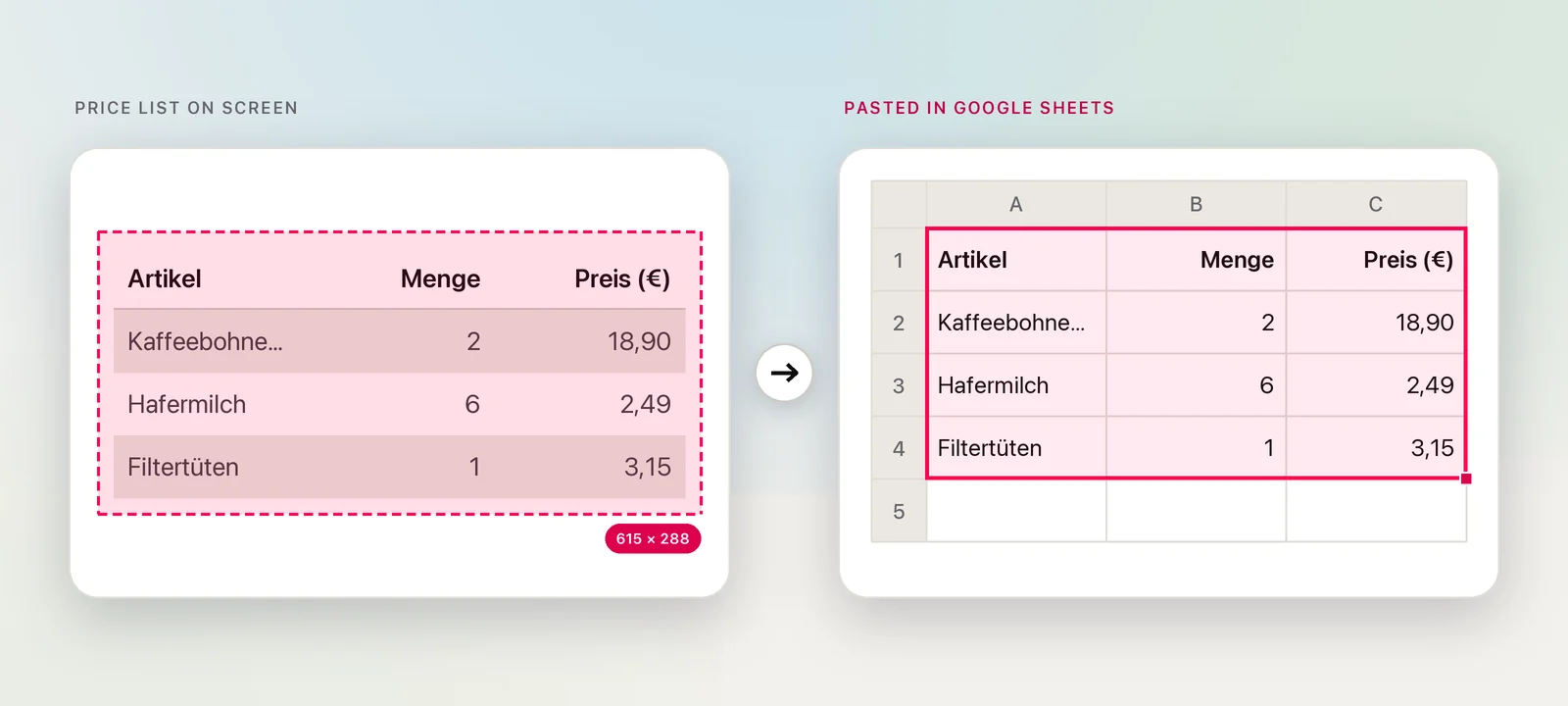
Sheets reads a table on the clipboard, as HTML or as tab-separated text, as cells. It works the same in Safari and Chrome:
- Capture the table with its header row.
- In Sheets, click the cell where the top-left value should go. The paste fills the cells below and to the right, replacing what’s there.
- Press ⌘V.
Paste values only
Press ⌘⇧V, or choose Edit → Paste special → Values only, when the sheet is already formatted. The values go in, and the destination keeps its own number formats, fonts, colours and borders. That’s usually what you want when you add this month’s rows under last month’s.
Text stuck in one column
If the paste ends up in column A, split it:
- Select the cells.
- Choose Data → Split text to columns.
- If Sheets picks the wrong separator, choose another from the Separator menu, or leave it on Detect automatically.
Splitting on spaces breaks an item such as “Kaffeebohnen 1 kg” into three cells, so look along each row afterwards. For separators, quoted values and the SPLIT function, see splitting pasted text into columns.
Tables on web pages: IMPORTHTML
When the table is a real HTML table on a public web page, you don’t need OCR at all. Put this in an empty cell:
=IMPORTHTML("https://example.com/prices", "table", 1)The last argument picks which table on the page to read, counting from 1. The result stays linked to the page. It can’t read tables that are pictures, sit behind a login or are drawn by scripts after the page loads. For those, and for the other ways to copy web tables, see copying a table from a website.
Locales, decimals and dates
Each spreadsheet has its own locale, and Google says it sets the default currency, date and number formatting. Your Mac’s region doesn’t matter here. In a spreadsheet set to the United States, 18,90 is text, not eighteen ninety. In one set to Germany, it’s a number.
- Choose File → Settings.
- Under General, pick the Locale that matches the source.
- Click Save settings, then paste.
Dates need the same care. 03/04/2026 is 3 April in most of Europe and 4 March in the United States. Before you trust a date column, look for a value that can only be read one way, such as 25/12.
In Unpixel
Unpixel recognizes tables from anything on your screen, on your Mac, with Apple’s Vision framework, so there’s no upload and no 2 MB limit. Press ⇧⌘2, drag over the table, let go, and paste into Sheets as cells.
- Tables in PDFs and images. From Clipboard reads a picture you’ve already copied, and Open Image… reads a saved file or up to 50 pages of a PDF.
- Translate the cells. Hold ⌥ as you let go to translate a table cell by cell into your language. Numbers and prices aren’t touched, so 18,90 stays 18,90; the locale still decides how Sheets reads it.
- One more format. To bring a table in with File → Import instead, right-click it in Unpixel’s history, choose Copy as CSV, and save the text as a .csv file first.
Frequently asked questions
Why does a pasted price stay left-aligned in Google Sheets?
Sheets didn’t recognize it as a number, usually because the spreadsheet’s locale uses a different decimal separator, or because of a stray space or symbol. Check File → Settings → Locale, then paste again.
Can IMPORTHTML read a table from an image?
No. IMPORTHTML reads tables and lists in a web page’s HTML. A table drawn as a picture, or rendered by a script, needs OCR instead.
Do I need a Google Sheets add-on for OCR?
Not for screen tables. Any tool that puts tab-separated cells on your Mac’s clipboard pastes into Sheets in Safari or Chrome. Check what an add-on does with your images before installing it.
Sources
- Convert PDF and photo files to text — Google Drive Help support.google.com
- Keyboard shortcuts for Google Sheets — Google Docs Editors Help support.google.com
- Split text, remove duplicates, or trim whitespace — Google Docs Editors Help support.google.com
- IMPORTHTML — Google Docs Editors Help support.google.com
- Set a spreadsheet’s location & calculation settings — Google Docs Editors Help support.google.com