TextSniper and Unpixel do the same core job. You press a shortcut, drag over text that won’t select, such as a paused video, a slide or a scanned page, and the words land on your clipboard. We make Unpixel, so read this with that in mind. Everything about TextSniper comes from its website and Mac App Store listing as of October 2026, linked under Sources.
If you only copy text from the odd photo or screenshot, you may not need either app. Live Text is built into macOS and free; our Live Text guide shows where it works.
Both copy text from anywhere on a Mac screen: press a shortcut, drag, paste. Pick TextSniper if your Mac can’t run macOS 26, or if you want text-to-speech or capture from an iPhone camera. Pick Unpixel on an Apple silicon Mac with macOS 26 if you want tables as spreadsheet cells, translation while capturing, a searchable history and multi-page PDFs.
At a glance
| TextSniper | Unpixel | |
|---|---|---|
| Start a capture | Keyboard shortcut or menu bar, then drag | ⇧⌘2 or menu bar, then drag |
| QR codes and barcodes | Yes | Yes |
| Line breaks | Keep Line Breaks option | Keep line breaks setting |
| Collect several captures | Additive clipboard mode | Hold ⇧ as you let go, plus a searchable history |
| Tables as spreadsheet cells | Not listed | Yes |
| Translation | Not listed | Hold ⌥ as you let go |
| Text-to-speech | Yes | No |
| Text from an iPhone or iPad camera | Yes (Import from iPhone or iPad) | No |
| Price, one-time | $7.99 for 1 Mac on its website; $9.99 on the Mac App Store | $5.99 for 1 Mac |
| Requirements | macOS Catalina or newer (website); macOS 12 or later (App Store) | macOS 26, Apple silicon |
| Where to buy | Its website or the Mac App Store | The Unpixel website only |
“Not listed” means the feature doesn’t appear on TextSniper’s website or App Store listing in October 2026. Apps change, so check the links before you decide.
Capturing text
Day to day, the two feel alike. Both live in the menu bar, both take a custom shortcut, and both put plain text on the clipboard the moment you let go. Both can keep line breaks as they appear on screen or join them into running sentences, which matters when you paste a paragraph from a PDF into an email.
The differences are in what happens around a capture:
- Collecting text. Both can gather several snippets into one paste. TextSniper calls it additive clipboard mode: new captures are appended to the text you already grabbed. In Unpixel, you hold ⇧ as you let go of a selection, and a setting picks a new line, a blank line or a space between passages. Unpixel also keeps each capture as its own row in a local history. You search it, filter it by Text, Links or QR Codes, and click a row to copy it again.
- Files. Unpixel also reads images and PDFs you already have: From Clipboard for a copied screenshot, and Open Image… for PNG, JPEG, HEIC, TIFF, GIF, BMP, WebP and PDFs of up to 50 pages per capture.
- Camera. TextSniper can take text from a page you photograph with your iPhone or iPad, through its Import from iPhone or iPad feature. Unpixel doesn’t import from a camera.
Tables, QR codes and translation
Both apps decode QR codes and barcodes and copy what they contain, so a Wi-Fi code or a link on a slide is covered either way.
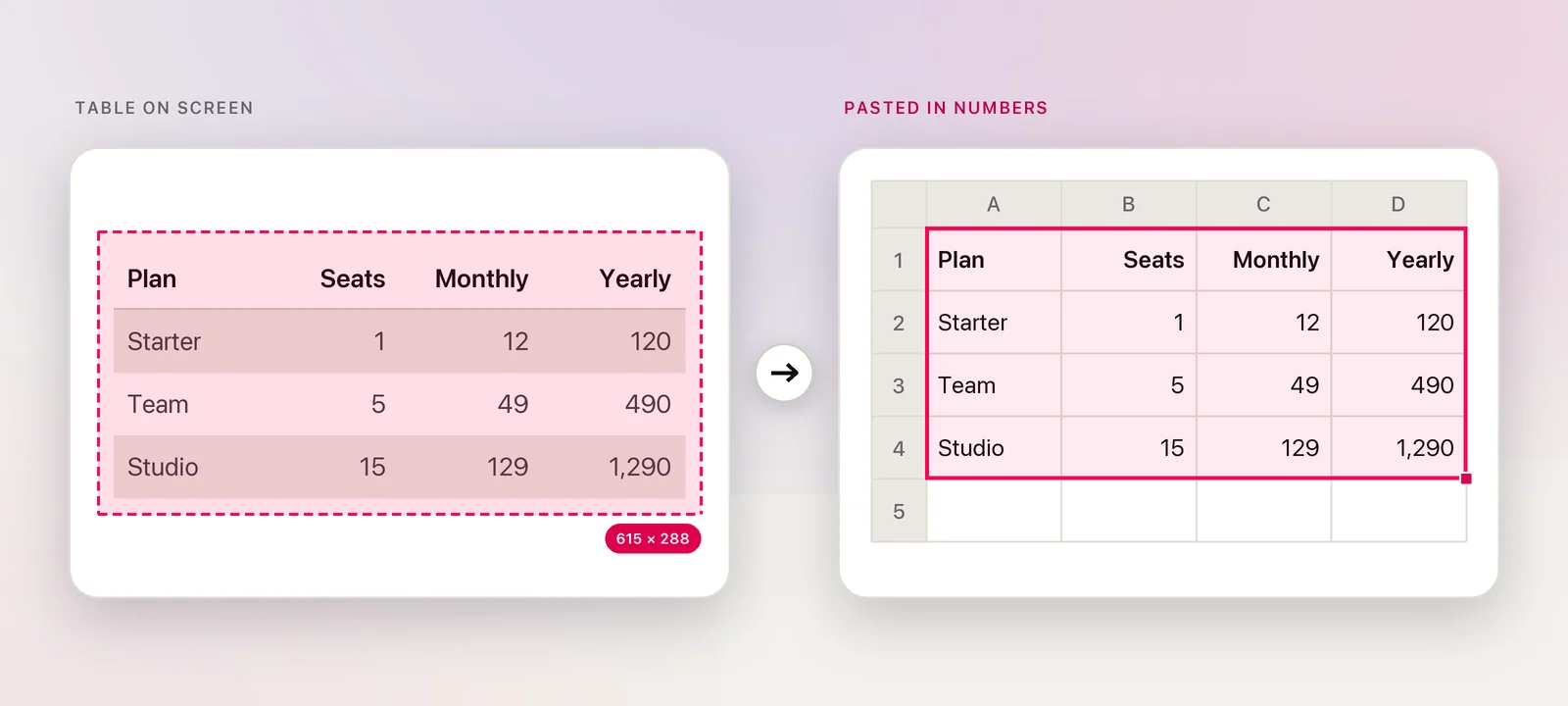
Tables are where they part. When most of an Unpixel selection is a grid, it copies real rows and columns, so the table pastes into Numbers, Excel, Google Sheets or Notes as cells. The history can copy the same table again as Markdown or CSV. TextSniper doesn’t list table handling; you’d paste the text and split it into columns yourself.
Translation is a similar story. In Unpixel, hold ⌥ as you let go of a selection and the clipboard gets the text in your language, translated on your Mac by Apple’s Translation framework. With TextSniper, you’d paste the text into a translator as a second step. If you rarely translate, that second step costs little.
Price and requirements
As of October 2026, TextSniper’s website lists a one-time license at $7.99 for one Mac or $9.99 for three, though one of its buy buttons showed $6.99, so check the price at checkout. Direct purchases come with a 7-day money-back guarantee, and its FAQ says major upgrades come at an extra cost. On the Mac App Store, TextSniper costs $9.99. Its website says it needs macOS Catalina or newer, and its App Store listing says macOS 12 or later.
Unpixel is also a one-time purchase: $5.99 for one Mac, $9.99 for two and $13.99 for three, with a 14-day money-back guarantee and no trial. It isn’t on the Mac App Store; you buy it from our pricing section. It needs macOS 26 and an Apple silicon Mac, which is the biggest practical difference between the two.
Where TextSniper is the better pick
- Your Mac can’t run macOS 26. TextSniper supports systems going back years. Unpixel won’t install there at all.
- You want text read aloud. TextSniper can speak captured text, which its site suggests for language learners and people with dyslexia. Unpixel has no text-to-speech.
- You capture paper documents. Pointing an iPhone at a letter and getting its text on the Mac is a TextSniper feature with no Unpixel equivalent.
- You prefer the App Store. If you like buying through Apple, with purchases tied to your Apple Account, TextSniper offers that.
Verdict
If you’re on an older Mac, or speech and camera capture matter to you, choose TextSniper. If your Mac runs macOS 26 on Apple silicon and you copy tables, read text in other languages or want to find last week’s capture again, Unpixel covers more of that work in one step. Whichever way you lean, test it on your own material within the refund window.
Frequently asked questions
Does TextSniper translate text?
As of October 2026, translation isn’t among the features on TextSniper’s website or its Mac App Store listing. You can paste what it captures into Apple’s Translate app or another translator.
Does Unpixel work on older Macs?
Not on Intel Macs or older systems: Unpixel needs Apple silicon and macOS 26 or later. On an older Mac, TextSniper is the better choice.
Can I try either app before paying?
Unpixel has no trial; it has a 14-day money-back guarantee instead. As of October 2026, TextSniper’s website offers a 7-day money-back guarantee on direct purchases.
Which one recognizes text more accurately?
Results depend mostly on your material: font size, contrast, language and layout. The fairest test is to capture the same three or four things you copy most often in both apps, within each refund window.