Every Mac with Live Text turned on can already copy words out of pictures, for free. So the honest question isn’t which tool is better, but whether the free one covers the places your text turns up. This page compares Live Text, as Apple describes it for macOS 26, with Unpixel, the capture app we make, and says plainly when you should save your money.
Live Text is enough if your text is already in a photo, a screenshot you open in Preview, a web image in Safari or a paused QuickTime video. It’s free and built into macOS. A capture app like Unpixel earns its price when the text is somewhere else on screen, such as a video call or a dialog, or when you need tables, QR codes, translation or a history.
What Live Text does well
Live Text treats the text in an image like text in a document. In Preview, Photos, Quick Look, Safari and paused video in QuickTime Player, you hover until the pointer becomes a text cursor, drag, and copy. Control-click the selection for more:
- Copy Text, Look Up and Translate, straight from the menu.
- Search with your default search engine.
- Act on details. Phone numbers, email addresses and websites get a small arrow, with options such as calling, adding a contact or opening the link.
It needs no setup beyond one switch, it costs nothing, and recognition happens on your Mac. For a photo of a whiteboard, a receipt you saved or a screenshot you’ve already opened, it’s hard to beat. Apple lists the supported languages on its macOS Feature Availability page, and notes that Live Text isn’t available in every region or language.
Where it can’t reach
Live Text lives inside apps, not on the screen as a whole. Text that isn’t an image in a supported app has to become one first. That rules out, without a detour:
- a slide in a Zoom, Teams or Google Meet screen share
- a dialog, a menu or an app’s settings window
- a game, a remote desktop session or a virtual machine
- paused video in most third-party players
The detour works, and it’s free. Press ⌃⇧⌘4 and drag over the text; the Control key copies the screenshot instead of saving a file. In Preview, choose File → New from Clipboard, then select the words and copy them. Done twice a week, that’s fine. Done twenty times a day, it’s exactly the job capture apps exist for.
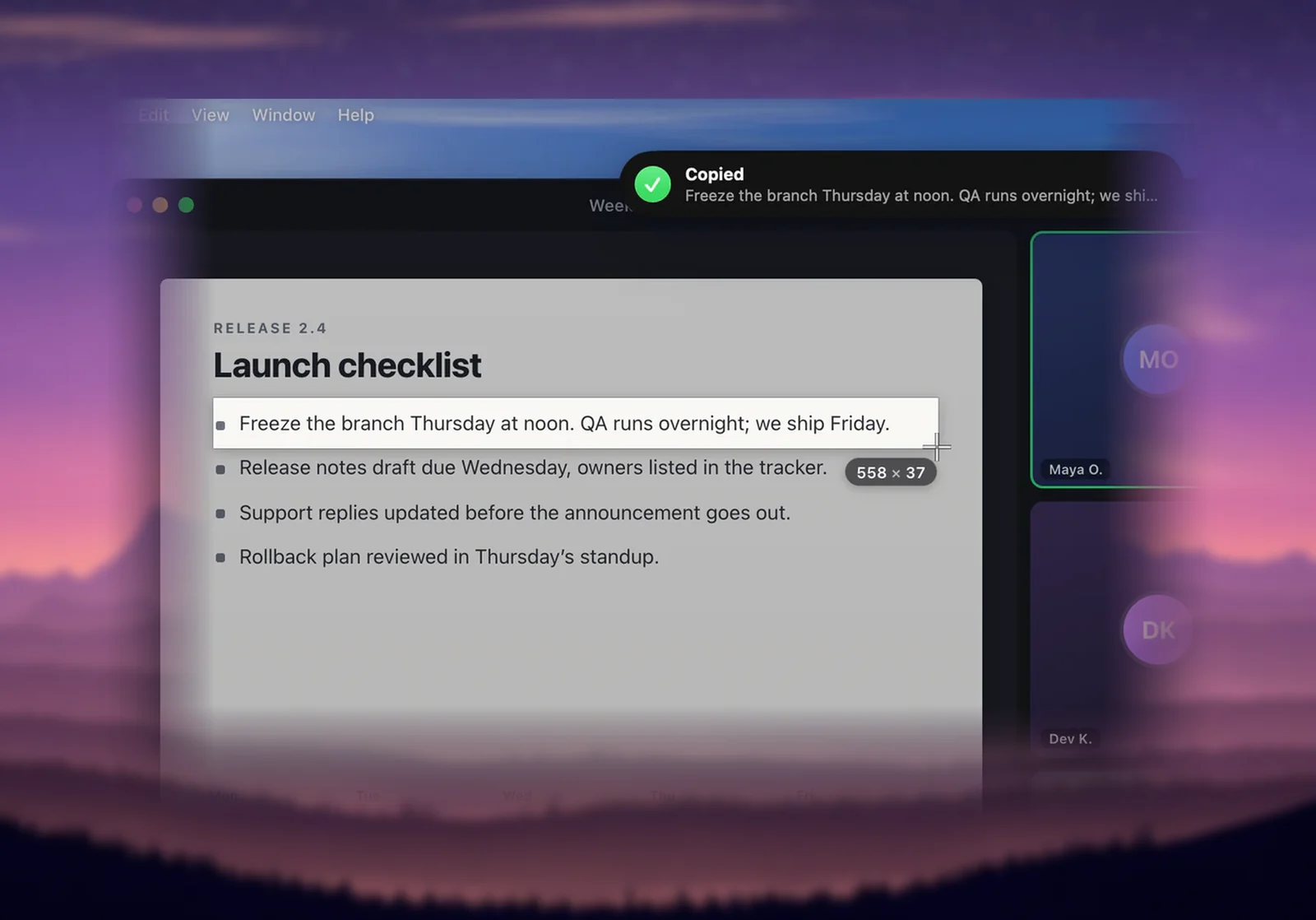
In Unpixel, the same job is one gesture. Press ⇧⌘2, drag over the words wherever they are, and let go; the text is on your clipboard and no screenshot file is created. It reads what’s on screen, so it can’t see video that macOS blocks from capture, such as many streaming services. Live Text can’t either.
Extras: tables, QR codes and history
Beyond reach, three differences decide most cases.
Tables. Apple’s Live Text guides describe selecting and copying text, not cells, so a table you copy usually needs sorting into columns by hand. Unpixel recognizes a captured grid as a table and pastes it into Numbers, Excel or Google Sheets as rows and columns. Our table capture page explains how it decides what counts as a table.
QR codes and barcodes. Apple doesn’t document QR codes as part of Live Text on the Mac. Unpixel decodes QR codes and common barcodes in a selection and copies their contents, such as a link or a Wi-Fi password.
History. Live Text copies to the clipboard and forgets. Unpixel keeps a searchable history on your Mac, filtered into Text, Links and QR Codes, with the app each capture came from. You can turn it off or cap its size in Settings → History.
Translation
Both can translate. With Live Text, you select words, Control-click and choose Translate, and a panel shows the result in the language you pick. That’s ideal for understanding a sign in a photo.
Unpixel translates as part of the capture: hold ⌥ as you let go, and the clipboard holds the translation instead of the original, ready to paste into a reply or a document. It uses Apple’s on-device Translation framework, and macOS asks before downloading a language. A captured table is translated cell by cell and still pastes as a table. If you want to read a translation, Live Text is enough; if you want to paste one, the capture saves a step. The translation help article has the details.
Verdict: stay free or pay
| Your situation | Use |
|---|---|
| Text in photos and screenshots you already have, now and then | Live Text |
| Acting on a phone number or address in a photo | Live Text |
| Text in calls, dialogs, games or any app, several times a day | A capture app |
| Tables you paste into a spreadsheet | A capture app with table support |
| Translations you paste rather than read | A capture app with translation |
| A Mac that can’t run macOS 26 | Live Text, or another app that supports your system |
Start with Live Text. If you catch yourself taking screenshots only to select text in them, that’s the sign a capture app will pay off. Unpixel is a one-time purchase from $5.99 for one Mac, and it needs macOS 26 on Apple silicon. Our list of free ways to do OCR on a Mac covers what else you can try before buying anything.
Frequently asked questions
Is Live Text free?
Yes. It’s part of macOS. Turn it on in System Settings → General → Language & Region, under Live Text, if it isn’t on already.
Do Live Text and Unpixel recognize text differently?
Both recognize text on your Mac with Apple technology. The bigger differences are where you can use each one and what happens to the result: cells for tables, decoded QR codes, a translation or a history entry.
Can Live Text read text in a Zoom or Teams screen share?
Not directly. Live Text works on images inside apps that support it, so you’d take a screenshot of the shared screen, open it in Preview and select the text there.
Does Unpixel replace Live Text?
No, they sit side by side. Live Text stays useful for the actions it offers on phone numbers, addresses and links in photos; Unpixel is for text anywhere on screen.
Sources
- Interact with text in a photo in Preview on Mac — Apple Support support.apple.com
- Use Live Text to interact with text in a photo in Photos on Mac — Apple Support support.apple.com
- Change Language & Region settings on Mac (Live Text) — Apple Support support.apple.com
- macOS Feature Availability (Live Text languages) — Apple apple.com
- Take a screenshot on Mac — Apple Support support.apple.com
- macOS Ventura is now available (Live Text in paused video frames) — Apple Newsroom apple.com