If you’re looking for TextGlance, you’ll find it on the Mac App Store under a new name: LudyLens. The listing’s version history records the rename in version 1.3.0, and the TextGlance website still links to it. LudyLens and Unpixel, the app we make, do the same basic job: press a shortcut, drag over text you can’t select, and paste it. Everything about LudyLens here comes from its developer’s websites and its App Store listing as of October 2026, linked under Sources. Where those sources disagree, we say which one a detail comes from.
TextGlance is now sold as LudyLens. Choose it if your Mac is an Intel model or runs macOS 15, if you want to start free with three captures a day, or if you copy code and want its indentation kept. Choose Unpixel on macOS 26 with Apple silicon for tables as spreadsheet cells, translation while capturing, multi-page PDFs and a longer history.
At a glance
| LudyLens (formerly TextGlance) | Unpixel | |
|---|---|---|
| Start a capture | ⇧⌘L, then drag | ⇧⌘2, then drag |
| Recognition | On your Mac, 20+ languages | On your Mac, Apple Vision, about 30 languages |
| QR codes and barcodes | Yes, on a separate shortcut | Yes, in the same capture |
| Code Mode that keeps indentation | Yes | No |
| Read the same area again | Yes (TextGlance site) | Yes, ⇧⌘1 (Capture Again) |
| Pin a capture on screen | Yes | No |
| Text from an iPhone or iPad camera | Yes | No |
| Tables as spreadsheet cells | Not listed | Yes |
| Translation while capturing | Mentioned, not described | Hold ⌥ as you let go |
| Open images and PDFs from files | Not listed | Yes, PDFs up to 50 pages per capture |
| History | 100 captures with thumbnails; 10 in the free version (TextGlance site) | 100, 500, 1,000 or 5,000 captures, or no limit |
| Free version | 3 captures a day | None; 14-day money-back guarantee |
| Price, one-time | $8.90 on Ludy’s site, $8.99 on the Mac App Store | $5.99 / $9.99 / $13.99 for 1 / 2 / 3 Macs |
| Requirements | macOS 15 or later, Apple silicon or Intel | macOS 26 or later, Apple silicon |
“Not listed” means neither the LudyLens page, the TextGlance site nor the App Store listing mentions it in October 2026. Rows marked “TextGlance site” come from the app’s original website, which may describe an older version.
Capturing text
In both apps, you press a shortcut, drag over the words, and the text is on your clipboard when you let go. Both read it on your Mac and detect the language for you. The differences are in how each app splits up the work:
- Several shortcuts in LudyLens. ⇧⌘L reads text, ⌥⇧L reads code, ⇧⌘C decodes a QR code or barcode, and ⌥⌘I imports from an iPhone. The original TextGlance site also describes Repeat Last Lasso (⌥⌘L), which reads the same area again without redrawing it. That’s handy for subtitles or a number that keeps changing.
- One capture shortcut in Unpixel. ⇧⌘2 handles text, links, tables and codes. If the selection holds a QR code or barcode, its contents are copied. Hold Space while dragging to move the selection. A second shortcut, ⇧⌘1 (Capture Again), reads the area of your last selection again, the same idea as Repeat Last Lasso.
- Pinning. LudyLens can pin a capture as a floating window that stays on top, and switch it between the original image and editable text. Unpixel has nothing like it.
- Paper. LudyLens can take a photo or scan a document with a nearby iPhone and read its text; its App Store notes mention iPad as well. Unpixel doesn’t import from a camera.
Protected streaming video shows up black to screen-capture apps, Unpixel included, so use subtitles or another source for those.
Tables, files and translation
Three Unpixel features have no counterpart on the LudyLens page.
Tables. When most of your selection is a grid, Unpixel copies rows and columns. The table pastes into Numbers, Excel, Google Sheets or Notes as separate cells, and the history can copy it again as Markdown or CSV. See how tables work.
Files. Open Image… reads PNG, JPEG, HEIC, TIFF, GIF, BMP, WebP and PDF files, up to 50 pages per capture, and From Clipboard reads a screenshot you’ve copied. LudyLens reads PDFs and images that are open on screen, but its page doesn’t describe opening files.
Translation. Hold ⌥ as you let go, and the clipboard gets the text in your language, translated on your Mac by Apple’s Translation framework. Ludy’s apps overview mentions “overlay translation” for LudyLens, but the LudyLens page doesn’t describe it, so check the current version if you need it. Our translation help article explains how Unpixel handles it.
Code and history
Code is where LudyLens has the edge. Its Code Mode is described as keeping multiple spaces, indentation and special characters, with a monospace preview in the history. The TextGlance site also lists text options: keep or merge line breaks, collapse spaces and convert smart quotes.
Unpixel has no code mode. With Keep line breaks on, each line stays on its own line, and code isn’t mistaken for a table. Turning off Language correction in Settings → Recognition helps keep identifiers as written. But lines usually come back flush left, so you re-indent them yourself, which matters most in Python and YAML. If you copy code from tutorials every day, that’s a real point for LudyLens. Our guide to copying code from a video covers the cleanup.
History is the other way round. LudyLens keeps 100 captures, each with a thumbnail, and you can search by text, date or source app. The TextGlance site says the free version keeps the last 10.
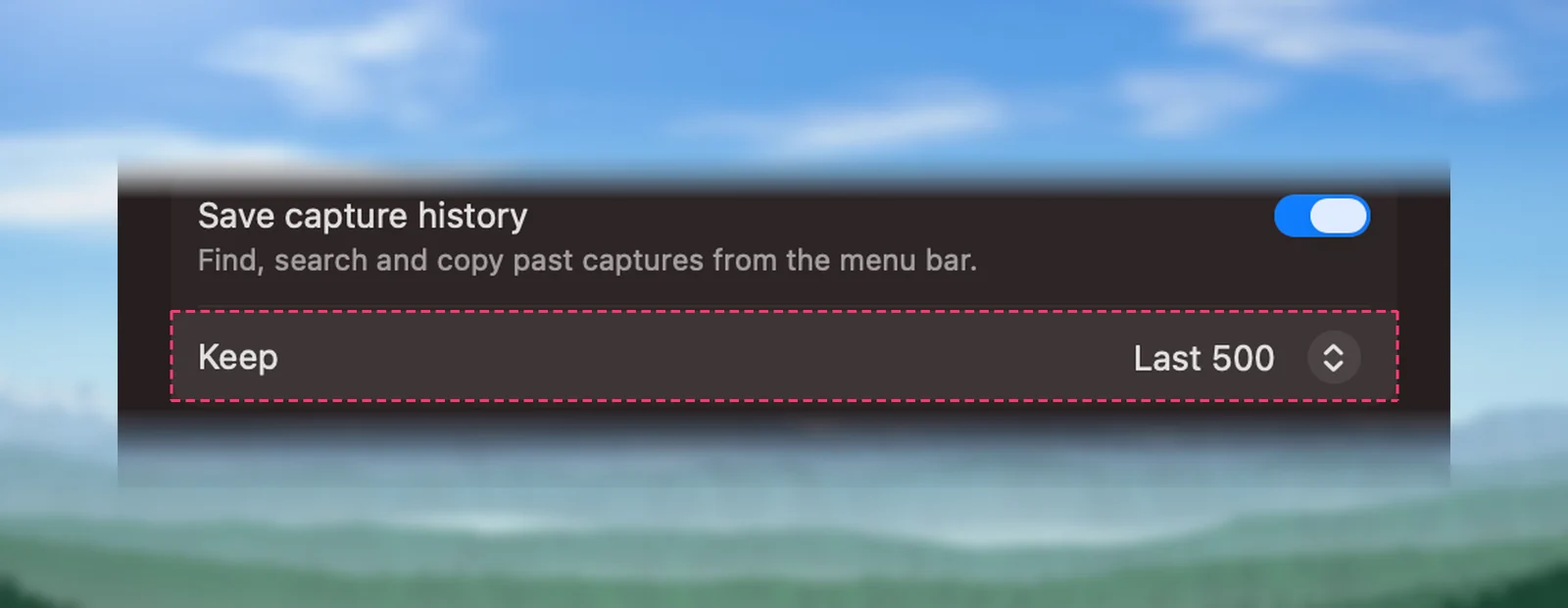
Unpixel lets you choose how much to keep in Settings → History: the last 100, 500, 1,000 or 5,000 captures, or everything. You can filter by Text, Links or QR Codes, see which app each capture came from, and click a row to copy it again. History stays on your Mac, and you can turn it off.
Price and free version
As of October 2026, LudyLens is a free download that allows three captures a day; the TextGlance site says the count resets at midnight. A lifetime license, with updates included according to Ludy’s FAQ, removes the limit. It costs $8.90 on Ludy’s website or $8.99 as an in-app purchase on the Mac App Store, where a cheaper “holiday deal” purchase was also listed. The TextGlance site says one purchase covers unlimited Macs; the LudyLens page doesn’t say. LudyLens needs macOS 15 or later and runs on Apple silicon and Intel Macs, although the old TextGlance site still says macOS 13.
Unpixel has no free version and no trial. It’s a one-time purchase of $5.99 for one Mac, $9.99 for two or $13.99 for three, with a 14-day money-back guarantee, from our pricing section. It needs macOS 26 on an Apple silicon Mac.
So Unpixel costs a little less for one Mac, and LudyLens may cost less across several Macs if the unlimited-Macs terms still apply. LudyLens’s daily free captures let you test it on real work before paying; with Unpixel, the refund window plays that role.
Verdict
- Your Mac is an Intel model or runs macOS 15: LudyLens. Unpixel won’t install there.
- You copy code from videos and docs: LudyLens, for Code Mode.
- You capture only a few times a day: LudyLens’s free version may be all you need.
- You paste tables into spreadsheets, translate what you capture or read multi-page PDFs: Unpixel.
- You want a long history to search back through: Unpixel, which can keep everything.
Both cost under $10 for one Mac, so let your work decide rather than the price.
Frequently asked questions
Are TextGlance and LudyLens the same app?
Yes. The TextGlance website links to a Mac App Store listing that now shows LudyLens, and the listing’s version history records the rename from TextGlance in version 1.3.0. As of October 2026, the seller is Ludy Ankas, LLC.
Is LudyLens free?
Partly. As of October 2026, it’s a free download that allows three captures a day, and a lifetime license removes the limit. Ludy’s website sells the license for $8.90; on the Mac App Store it’s an $8.99 in-app purchase.
Does either app keep the indentation in code?
LudyLens has a Code Mode that its developer says keeps indentation, multiple spaces and special characters. Unpixel has no code mode: it keeps each line, but lines usually come back flush left, so you re-indent them in your editor.
Can I run LudyLens and Unpixel side by side?
Yes. Their default shortcuts don’t clash: LudyLens uses ⇧⌘L, ⌥⇧L, ⇧⌘C and ⌥⌘I, and Unpixel uses ⇧⌘2 and ⇧⌘1. Both let you change their shortcuts.
Sources
- LudyLens — Ludy (features, shortcuts, price, requirements and FAQ, read October 2026) ludy.app
- LudyLens, formerly TextGlance, on the Mac App Store (version history, in-app purchases, requirements, read October 2026) apps.apple.com
- TextGlance — original website (free plan, history, Code Mode, text processing, read October 2026) textglance.reckr.app
- Ludy — apps overview (read October 2026) ludy.app