Unpixel reads text from your screen, so it’s fair to ask where that text goes. Everything you capture stays on your Mac. The app makes two kinds of network requests, neither one contains anything you captured, and you can check both yourself.
Nothing you capture leaves your Mac: the image is read in memory with Apple’s Vision framework and discarded, and text, history and translations stay local. Unpixel goes online for two things only: license checks with Dodo Payments (your key, plus your Mac’s name and model when you activate) and an optional daily update check. There’s no account and no analytics.
What never leaves your Mac
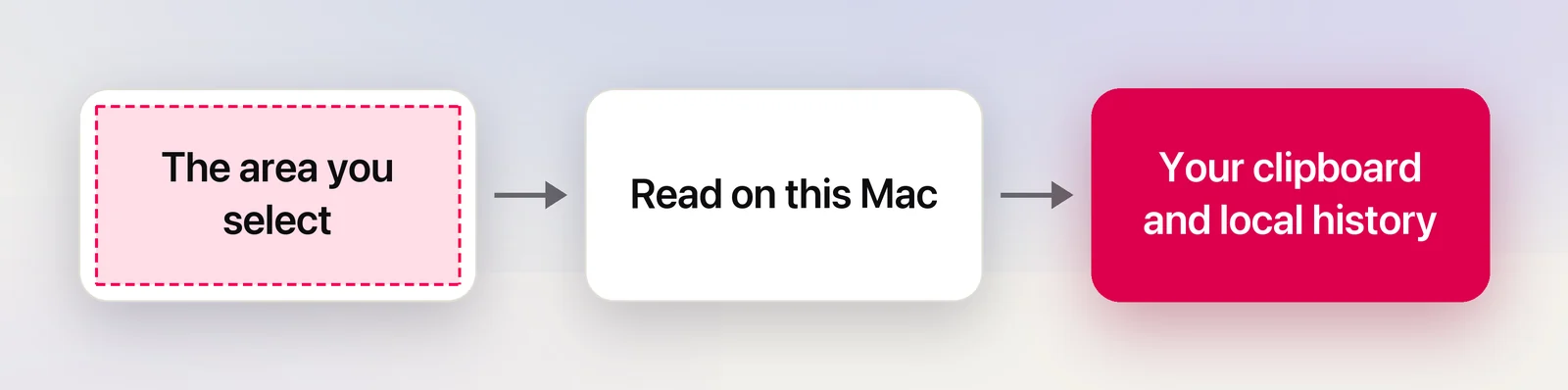
- The image of your selection. It’s read in memory with Apple’s Vision framework as you let go (or when you press Capture Again), then discarded. It’s never saved to disk and never uploaded.
- The recognized text, links and QR code contents. They go to your clipboard and, if history is on, to a local file:
~/Library/Application Support/Unpixel/history.json. - Translations. Apple’s Translation framework runs on your Mac.
- Images and PDFs you open, drop on the panel or read with From Clipboard.
- Your settings, kept in the standard macOS preferences system, along with the position of your last selection for Capture Again. Only the rectangle is kept, never what it showed.
There’s no account and no sign-in. Unpixel has no analytics, no usage tracking and no ads.
License checks
Your license is checked with Dodo Payments, the store that sells Unpixel.
| When | What’s sent |
|---|---|
| You activate | Your license key and this Mac’s name and model, such as “Jane’s MacBook Pro (Mac15,3)” |
| A check runs | Your license key and this Mac’s activation ID |
| You deactivate | Your license key and this Mac’s activation ID |
Checks run at launch (when the last one is more than an hour old), about once a day while Unpixel is open, and after your Mac wakes if one is due. On activation, the server answers with the product you bought and the name and email from your purchase. Unpixel keeps them in your login keychain so Settings → License can show who it’s licensed to.
Every request carries a short label with the app and macOS versions, such as “Unpixel/1.0.0 (macOS 26.6)”, and no cookies. License checks can’t be turned off, but they don’t need to succeed every day: Unpixel keeps working for 30 days after the last successful one. See Using Unpixel offline.
Update checks
While Automatically check for updates is on in Settings → General (it is by default), Unpixel downloads a small public file from its website about ten seconds after launch and then once a day. The file lists the newest version. Like any web request, it reveals your IP address and the same version label to the website’s host. No license key or capture data is added.
Nothing is downloaded or installed for you. Turn the setting off and Unpixel makes no update requests unless you click Check Now or Check for Updates…. Updating Unpixel has the details.
Things you start yourself
A few buttons hand off to another app, which then uses the network as it always does:
- Open Link, and Open QR links automatically, open the link in your default browser.
- Share… sends a capture to whichever service you pick in the macOS share sheet.
- Shortcuts and x-callback-url links hand the recognized text to the app that asked for it, such as the Shortcuts app, on your Mac. Unpixel only returns text to apps, never to web pages.
- Buy, Customer Portal, Release Notes and Download open your browser; Email Support opens your mail app.
- The first time you translate from a new language, macOS asks before downloading it from Apple. That download belongs to macOS and is shared with Apple’s own apps.
Check it yourself
- Turn off Wi-Fi. Captures, history, From Clipboard, Open Image… and translation between downloaded languages all keep working.
- Activity Monitor. Open it from Applications → Utilities, click Network and type “Unpixel” in the search field. The sent and received byte counts don’t move when you capture. They change only around a license or update check.
- Terminal. Run
nettop -p Unpixelto watch Unpixel’s connections live, and press Q to stop. When a check runs, the only destinations are Dodo Payments’ license server and Unpixel’s website.
An outgoing firewall app shows the same two destinations.
Delete what’s stored
- History: Settings → History → Clear History…, or turn off Save capture history. History settings explains both.
- Everything on this Mac: follow Uninstall Unpixel completely.
- Purchase records held by the developer: the Privacy Policy explains your rights and how to ask.
macOS also requires Screen Recording permission for any app that reads screen pixels. Unpixel uses it only for the area you select, as you let go, or for that same area when you press Capture Again. Allow Screen Recording for Unpixel covers that permission.
Frequently asked questions
Does Unpixel read my clipboard in the background?
No. It reads the clipboard only when you choose From Clipboard or open unpixel://clipboard, and it writes to the clipboard when a capture finishes.
Can I use Unpixel on a Mac that’s never online?
Not permanently. Activation needs a connection once, and the license has to be checked at least once every 30 days. Captures themselves never need the internet.
Why does activation send my Mac’s name?
So you and support can tell your activations apart, for example when freeing a Mac you no longer have. Rename the Mac in System Settings → General → About before activating if you’d like a neutral name.
Sources
- View network activity in Activity Monitor on Mac — Apple Support support.apple.com