Unpixel copies text only once it’s activated on your Mac; there’s no trial mode. Activation takes a few seconds with an internet connection and happens once per Mac.
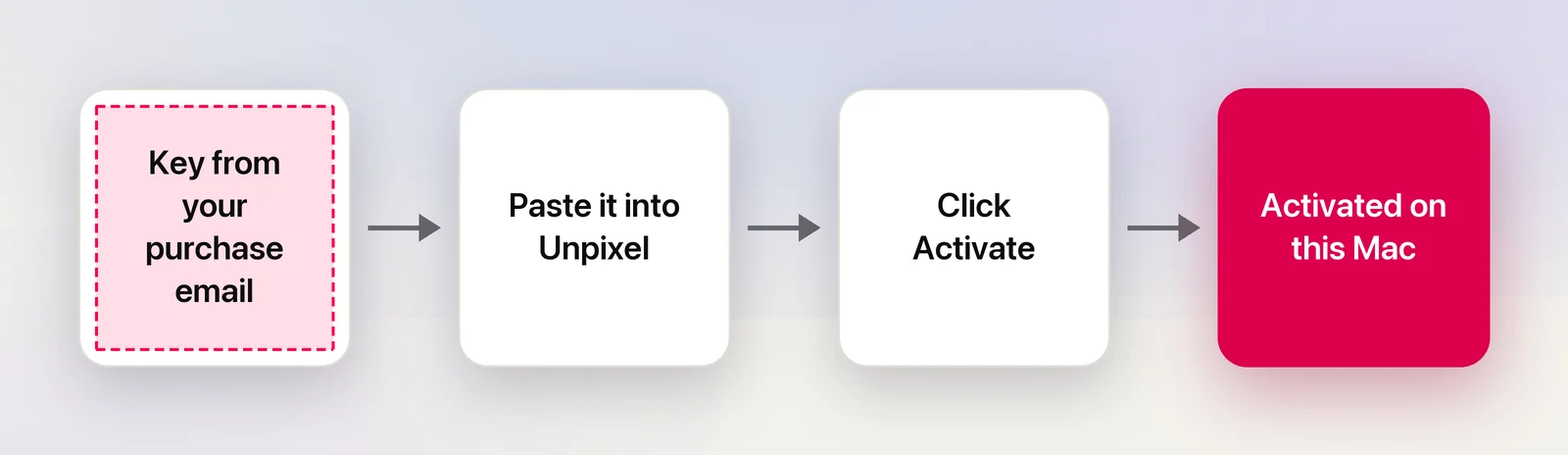
Copy the license key from your purchase email or the confirmation page. Open Unpixel, paste it into the field on the Activate your license page of the welcome guide, or in Settings → License, and click Activate. Once it says Activated on this Mac, captures work. Activation needs an internet connection and uses one of your license’s Macs.
Find your key
Your key is shown on the confirmation page right after checkout, under “Your license key”, and in the purchase email from Dodo Payments, the store that sells Unpixel. Each purchase has one key, and that key works on 1, 2 or 3 Macs depending on what you bought.
If you can’t find it, Where’s my key? under the key field in Unpixel points you to it, and Lost your license key? covers every way to get it back.
Activate in the welcome guide
The welcome guide opens the first time you launch Unpixel.
- Click Get Started. The next page is titled “Activate your license.”
- Click the field that says “Paste your license key” and press ⌘V.
- Click Activate, or press Return. The button reads Activating… while Unpixel checks the key.
- The card changes to Activated on this Mac, with your email address and the license you bought.
- Click Continue to set up Screen Recording.
Continue stays unavailable until the key is activated. Spaces or line breaks that come along when you copy from an email are removed for you.
Activate in Settings
If the welcome guide is already done, for example after you moved your license from another Mac:
- Right-click the Unpixel icon in the menu bar and choose Enter License Key…, or click Enter Key… in the orange banner at the top of the panel. Both open Settings → License.
- Paste the key into the field under Activate Unpixel and click Activate.
Once it works, the pane shows Status: Activated and your key, hidden except for its last characters. Below that come the Product (“Activates up to 2 Macs”, for example), Licensed to with your email, and This Mac, such as “Activated on Oct 20, 2026 as Jane’s MacBook Pro (Mac15,3)”.
If you try to capture before activating, Unpixel opens this screen and says “Activate Unpixel to start copying text”.
The Activate in Unpixel button
Open the confirmation page on the Mac where Unpixel is installed and you’ll find an Activate in Unpixel button. It opens Unpixel with your key already filled in. You still click Activate yourself; the link never activates anything on its own.
If this Mac already uses a different key, Unpixel asks “Replace your current license?” first. Replace License deactivates this Mac on the old key, then activates the new one.
What activation sends
Activating sends your key and this Mac’s name and model identifier, such as “Mac15,3”, to Dodo Payments to check it. The name helps you and support tell your Macs apart. It’s the name set in System Settings → General → About, so rename the Mac there first if you’d like a different label. Nothing you capture is ever sent.
After activating, Unpixel checks the license again from time to time and keeps working offline for up to 30 days between checks. Using Unpixel offline explains how that works.
If activation fails
The reason appears under the key field. The most common ones:
| The message starts with | What to do |
|---|---|
| That key wasn’t found. | Check for typos, or copy the key straight from the email again |
| This key is already active on all of its Macs. | Deactivate a Mac you no longer use, or email support to free one |
| This key has been disabled, usually after a refund. | Email support if that’s a mistake |
| Couldn’t reach the license server. | Check your connection; a VPN or firewall may be blocking it |
| This Mac is already activated with another key. | Deactivate the current key in Settings → License first |
Messages that only support can resolve come with an Email Support link. Every message is explained in License activation errors.
Frequently asked questions
Do I have to activate again after updating or reinstalling Unpixel?
No. The activation is kept in your keychain on this Mac, so a new version or a fresh copy of the app picks it up. You only activate again after deactivating, or on a Mac that has been erased.
Can I activate without an internet connection?
No. Activation has to reach the license server once. After that, captures work offline, and Unpixel only needs to check in now and then.