CleanShot X and Unpixel overlap on exactly one feature: select part of the screen, get the text. For CleanShot, that’s one tool among dozens in a screenshot and recording suite. For Unpixel, the app we make, it’s the whole product. So the real question is whether CleanShot’s text tool does enough of what you need, or whether a dedicated one is worth adding.
Details about CleanShot X come from its own features and pricing pages, as of October 2026.
If you already own CleanShot X and copy plain text now and then, its built-in text recognition is probably enough. A text-only app like Unpixel adds tables that paste as cells, translation while you capture, a searchable text history and multi-page PDFs. If you need screenshots, annotation and recordings as well, CleanShot X is the broader tool.
A screenshot suite vs a text tool
CleanShot X replaces the Mac’s screenshot tool with a bigger one: scrolling capture, an annotation editor, pinned screenshots, screen recording with GIF export, and share links through CleanShot Cloud. Text recognition sits alongside all of that. Our comparison of CleanShot X with the built-in screenshot tool covers those features in detail.
Unpixel does none of that. It doesn’t save images, annotate or record. It reads the area you drag over and turns it into text, tables, links or decoded codes, and keeps a record of what it read. If you were hoping one app could do both jobs, CleanShot X is the one that does; Unpixel only competes on the text part.
CleanShot’s text recognition vs Unpixel
In both apps the basic flow is the same: start the text capture, select an area, and the recognized text goes to your clipboard. CleanShot’s features page says its recognition is performed completely on-device, supports more than 30 languages, and reads QR codes. Unpixel also recognizes text on your Mac, with Apple’s Vision framework, in about 30 languages, and detects the language for you or uses one you choose.
Where they differ is in the controls around the result. Unpixel lets you choose between Accurate and Fast recognition, turn language correction on or off for codes and part numbers, and decide whether line breaks are kept or joined into paragraphs. Every capture goes into a searchable history, so text you grabbed yesterday is a search away rather than lost behind the next copy.
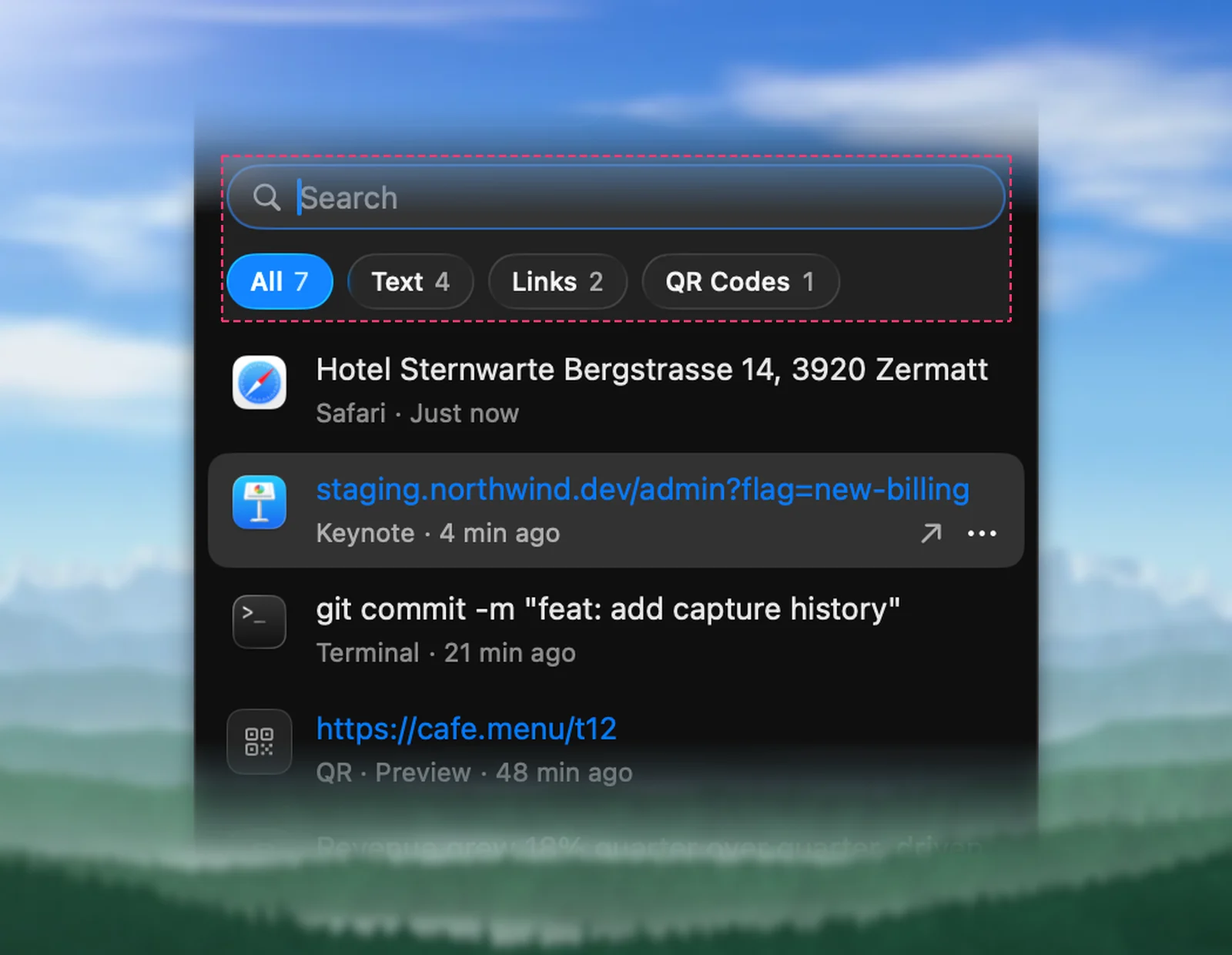
CleanShot also keeps a capture history, of up to a month of screenshots according to its features page. If you mostly need to find an image again, that’s the better fit. If you need to find a sentence, a text history is quicker to search.
Tables, QR codes and translation
| CleanShot X | Unpixel | |
|---|---|---|
| Copy text from a selected area | Yes | Yes |
| Recognition runs on your Mac | Yes | Yes |
| Read QR codes | Yes | Yes, plus barcodes such as EAN, UPC and Code 128 |
| Paste a table as spreadsheet cells | Not listed | Yes |
| Translate while capturing | Not listed | Hold ⌥ |
| Read images and PDFs from files | Not listed for OCR | Yes, PDFs up to 50 pages per capture |
| Screenshots, annotation, recording | Yes | No |
“Not listed” means CleanShot’s features page didn’t mention it in October 2026.
Two of these change real work. A captured table in Unpixel pastes into Numbers, Excel or Google Sheets as rows and columns, instead of one value per line; the PDF table to Excel guide shows why that usually breaks. And holding ⌥ as you let go copies a translation into your language, made on your Mac by Apple’s Translation framework. If you never touch tables or other languages, neither matters, and CleanShot’s tool covers you.
Price
As of October 2026, CleanShot X Basic costs $35 once, including a year of updates and 1 GB of cloud storage; renewing updates afterwards is optional at $19 a year. CleanShot Pro, with unlimited cloud storage and team features, is $10 per user a month billed annually. CleanShot is also included in Setapp, and it needs macOS 13 or newer. Its pricing page says there’s no trial, with a 30-day money-back guarantee.
Unpixel costs $5.99 once for one Mac, $9.99 for two or $13.99 for three, with a 14-day money-back guarantee. It needs macOS 26 and an Apple silicon Mac, so CleanShot runs on far more Macs.
Who needs which
- You take and mark up screenshots every day. CleanShot X. Its text tool comes included, and for occasional plain text it’s all you need.
- You copy text more than you take screenshots. Unpixel is cheaper and focused on that one job, provided your Mac runs macOS 26.
- You move tables or other languages into documents. Unpixel, possibly alongside CleanShot if you use its other tools.
- You’re on an older macOS. CleanShot X, or the free ways to copy text on a Mac.
If you already own CleanShot X, you may not need a second app. Try its text tool on the things you copy most, especially tables and PDFs, before deciding.
Frequently asked questions
Does CleanShot X’s OCR work offline?
CleanShot’s features page says its text recognition runs completely on your Mac and the text doesn’t leave it. Uploading screenshots to CleanShot Cloud is a separate, optional feature.
Can I run CleanShot X and Unpixel together?
Yes. Give each its own shortcut. Unpixel starts with ⇧⌘2 and you can change or clear it in Settings → General; check that it doesn’t clash with a shortcut you set in CleanShot.
Is CleanShot X a subscription?
Not necessarily. As of October 2026, CleanShot Basic is a one-time $35 purchase with a year of updates, and renewing updates after that is optional. CleanShot Pro is billed per user.
Does Unpixel take screenshots?
No. Unpixel reads the area you select and copies its text; it doesn’t save an image or offer annotation. For pictures of your screen, use the built-in Screenshot tool or a suite like CleanShot X.
Sources
- CleanShot X features (text recognition, read October 2026) cleanshot.com
- CleanShot X pricing (read October 2026) cleanshot.com