An app that reads your screen can see whatever is on it: messages, statements, client names, numbers you’d rather keep to yourself. So the first question to ask about any OCR app is where that text goes. For Unpixel the answer is short: nowhere. This page lists what stays on your Mac, the little that goes online, and how to check both yourself.
Unpixel reads text with Apple’s Vision framework on your Mac, and captures never leave it. There’s no account and no analytics. It goes online for two things only: license checks with Dodo Payments, which receive your key and your Mac’s name and model, and an optional update check. Screen Recording is used only for the area you select, when you let go or press Capture Again.
What stays on your Mac
A capture has four steps, and all of them happen locally:
- Reading the area. When you let go of a selection, Unpixel reads that rectangle once; Capture Again reads it once more when you press its key. The image is never saved as a file or a video.
- Recognizing the text. Apple’s Vision framework does the work on your Mac, with or without an internet connection.
- Translating, if you ask. Apple’s Translation framework runs on your Mac too. macOS asks before downloading a language, and the download comes from Apple.
- Keeping the result. The text goes to your clipboard and, unless you turn it off, into a history file in your user Library.
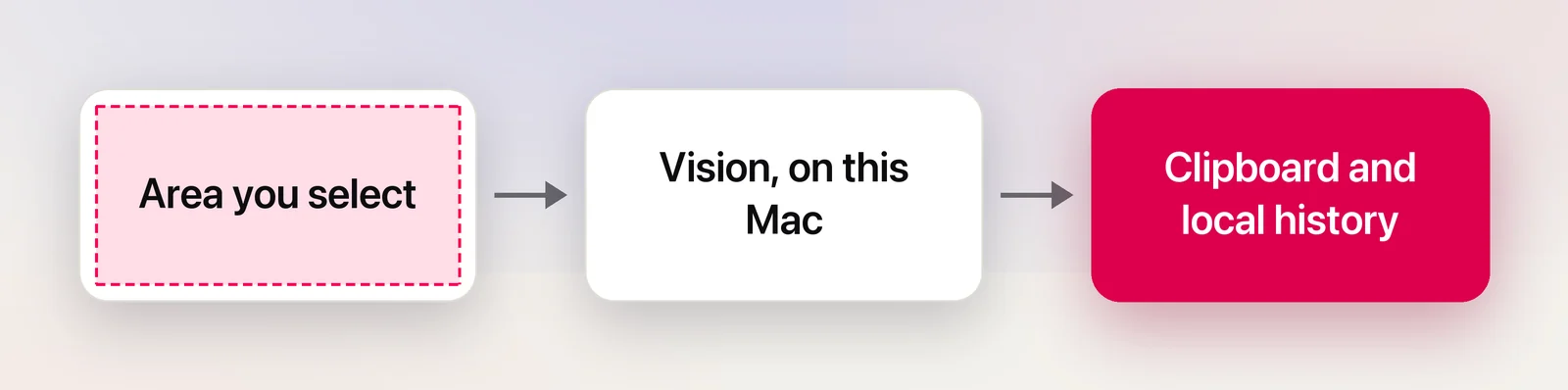
Your settings live in your Mac’s preferences, along with the position of your last selection for Capture Again (never its contents), and your license key is kept in the Keychain. Nothing about a capture is uploaded at any point. When a shortcut asks for the text through an x-callback-url link, Unpixel hands it to that app on your Mac, and only ever to apps, never to web pages.
No account, no analytics
You don’t sign up, log in or link an email address to use Unpixel. You buy a license, paste the key from your receipt email, and that’s it. There’s no analytics or tracking code in the app and no third-party libraries reporting usage, so nobody counts what you capture, how often, or from which apps.
The only network connections
Unpixel goes online for two jobs, and you can see exactly what each one sends:
| Connection | When | What’s sent |
|---|---|---|
| License activation | When you press Activate | Your license key, your Mac’s name and its model identifier, to Dodo Payments |
| License check | At launch if the last check is over an hour old, daily, and when the Mac wakes | Your license key and this Mac’s activation ID, to Dodo Payments |
| Update check (optional) | About 10 seconds after launch, then daily | A request for a small version file on Unpixel’s website |
The Mac’s name is the one shown in System Settings → General → About, such as “Sam’s MacBook Air”. Rename it before you activate if you’d rather not share it. Like any web request, both checks reveal your IP address to the server they reach.
The update check only reads a version number. It never downloads or installs anything; when an update exists, you download it yourself. It’s on by default; turn it off with Automatically check for updates in Settings → General. The license check has no off switch, but a missed check does no harm: Unpixel carries on for 30 days from the last one that got through.
Two other actions use the network, and only because you choose them. Open Link in your history opens a web address in your browser. Open QR links automatically, off by default, opens a scanned QR code’s web address the same way.
Screen Recording, used narrowly
Any app that reads other apps’ windows needs Screen Recording permission from macOS, screenshot tools and video-call apps included. The permission itself is broad, so what matters is how an app uses it. Unpixel uses it for one thing: reading the rectangle you drag, as you let go, and reading that same rectangle again when you press Capture Again.
- Nothing runs in the background, and nothing is recorded.
- Every capture starts with your selection, whether you press ⇧⌘2, use the menu or open an
unpixel://capturelink. Capture Again only reuses that rectangle when you press its key, and no link can trigger it. - Its own capture overlay is left out of what it reads.
You can withdraw the permission at any time in System Settings → Privacy & Security → Screen & System Audio Recording. Unpixel then tells you it needs it the next time you capture. For a wider look at the permission, read Is Screen Recording permission safe to grant?
History under your control
Everything you capture is kept in a single file on your Mac, and you decide what happens to it. Set a limit from the last 100 captures to forever, delete single rows, clear it all, or stop saving new captures. Searchable capture history covers each control.
The clipboard is shared territory. Once text is on it, any app you paste into can read it. If Universal Clipboard is on, it can also reach your nearby Apple devices, and Spotlight on macOS Tahoe can keep a clipboard history. Those are macOS features with their own settings; clipboard privacy on Mac explains them.
Check it yourself
You don’t have to take a privacy page’s word for it:
- Watch the traffic. Open Activity Monitor, click Network, and type “Unpixel” in the search field. Capture a few things and watch its Sent Bytes and Rcvd Bytes stay the same.
- Use a firewall. LuLu, a free and open-source firewall from Objective-See, alerts you when an app makes an outgoing connection you haven’t approved, and lets you allow or block it. Block Unpixel’s update check if you like; block the license check too, and the app keeps working for up to 30 days after its last successful check.
- Go offline. Turn off Wi-Fi and capture something. Recognition and downloaded translation languages keep working.
- Review the permission. Privacy & Security lists every app with screen access, Unpixel included.
For a field-by-field list of each request, including what the license server sends back, see what Unpixel sends over the network.
Frequently asked questions
Does Unpixel work offline?
Yes. Recognition runs on your Mac, and so does translation once a language is downloaded. The license needs a successful check at least once every 30 days.
Can Unpixel see my screen when I’m not capturing?
No. It reads only the rectangle you draw, once, when you let go, or that same rectangle again when you press Capture Again. There’s no background capture, no recording and no link or script command that reads the screen without your selection.
Which permissions does Unpixel ask for?
Only Screen Recording. The ⇧⌘2 shortcut works without Accessibility access, and Unpixel never asks for your camera, microphone, contacts or location.
Sources
- Control access to screen and system audio recording on Mac (macOS Tahoe 26) — Apple Support support.apple.com
- View network activity in Activity Monitor on Mac — Apple Support support.apple.com
- LuLu, a free open-source firewall for macOS — Objective-See objective-see.org
- Use Universal Clipboard to copy and paste between your Apple devices — Apple Support support.apple.com