Sentence mining is a simple habit: collect real sentences from the shows, games and comics you enjoy, and study those instead of textbook examples. The slow part is getting the sentence out. Typing a line in a script you can’t type yet, or a kanji you can’t read, can take longer than learning the word. Text recognition (OCR) copies the line for you, so you can spend the time on the language.
Pause on a line with one new word in it, copy the text with Live Text or a screen OCR tool, and look the word up with a force click or ⌃⌘D. Keep the original sentence plus a translation as a hint, and add both to a flashcard, with the source noted. For vertical Japanese, use Live Text; Unpixel reads horizontal lines.
Sentence mining in 60 seconds
- Pick the right sentence. One you understand except for a single new word or grammar point. Sentences with three unknowns are too much to learn at once.
- Copy it as text, not as a screenshot. Text can be looked up, searched and pasted into a flashcard.
- Look up the new word and note its reading and meaning.
- Add a hint: a translation of the whole sentence, kept on the back of the card.
- Note the source: the show and episode with a timestamp, or the game and chapter. Context is what makes the sentence stick.
The rest of this guide is about doing steps 2 to 4 quickly on a Mac.
Capture from videos, games and comics
Videos. Turn on subtitles in the language you’re learning, pause on the line, and go full screen so the text is large and sharp. In QuickTime Player and other apps that support it, Live Text lets you drag across the subtitle and copy it. In a browser player you usually need a screenshot instead: press ⌃⇧⌘4, drag over the subtitle, then choose File → New from Clipboard in Preview and select the text. Protected streams often show up black in screenshots, so for those use the service’s own subtitle tools.
Games. Dialogue boxes are ideal: one or two lines, large type, and a pause until you press a button. Run the game in a window or borderless window if you can, so you can reach it without switching away. Stylised fonts and text over busy backgrounds are where recognition struggles.
Comics and manga. Work one speech bubble at a time. Most Japanese manga sets text vertically, and furigana add small extra lines. Live Text can read vertical Japanese columns. Unpixel is built for horizontal lines, so use Live Text for vertical bubbles and Unpixel for horizontal subtitles, signs and dialogue boxes. Extracting text from manga covers both cases.
Look up words instantly
Once the sentence is text, your Mac’s dictionary is a click away:
- Force click a word on the trackpad, or tap it with three fingers if your trackpad is set that way.
- With a keyboard, hold the pointer over the word and press ⌃⌘D.
- Add bilingual dictionaries in the Dictionary app’s Settings. Tick the language pairs you want, and Look Up includes them in its results.
- Translate a selection: Control-click selected text and choose Translate in apps that offer it.
Paste the sentence into Notes or TextEdit first if the app you copied from doesn’t support Look Up. Looking up words on Mac has the details.
Keep the original and a translation
A translation helps you check your understanding, but it isn’t the thing you’re learning. Keep the original as the front of the card and the translation as a hint on the back. Machine translation is fine for that job: it gets the gist of most sentences and flattens the subtle parts, like politeness levels, slang and dropped subjects. Treat any sentence where the hint doesn’t match your reading as a question for a dictionary, a grammar guide or a teacher.
In Unpixel
Unpixel can give you both in one capture. In Settings → Translation, choose your language under Translate into and turn on Copy original and translation. Then press ⇧⌘2, drag over the subtitle or dialogue line, and hold ⌥ as you let go. The clipboard gets the original sentence, a blank line, and the translation.
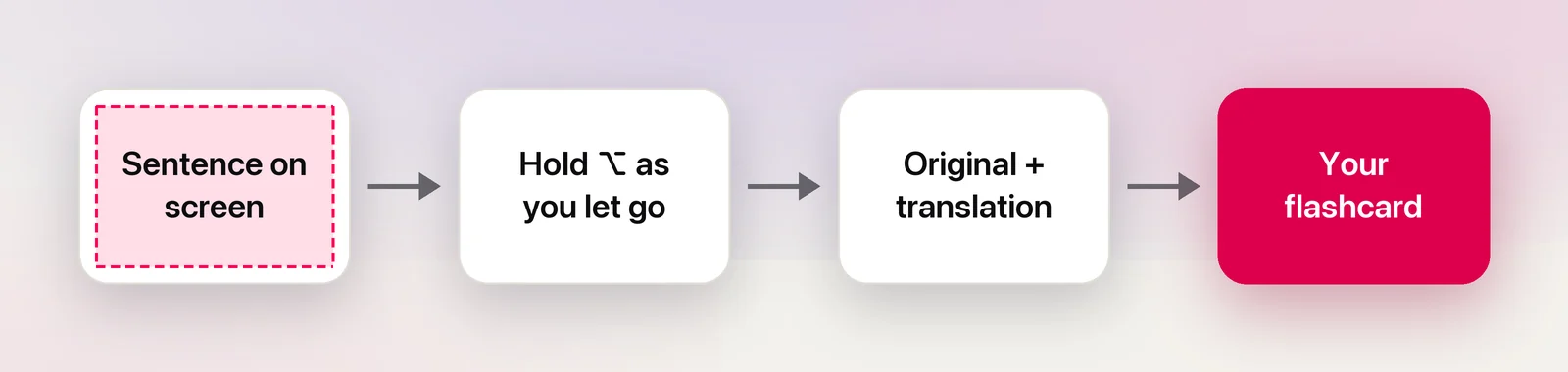
Translation uses Apple’s Translation framework on your Mac. The first time you translate a language, macOS asks before downloading it. For mining, a few more details help:
- Without ⌥ you get only the original, which is often all you want for a card.
- The history keeps every line with the app it came from, and you can search it later for a word you half-remember.
- Right-click a line in the history and choose Translate & Copy if you decide later that you want the translation.
- Turn off Language correction in Settings → Recognition if names or slang keep getting “corrected”.
Into Anki
Anki’s desktop app takes pasted text directly. A simple card layout for mined sentences:
- Open Add and choose a note type with front and back fields, or a Cloze type if you like hiding the target word.
- Paste the original sentence into the front, and make the new word bold.
- Paste the translation, the word’s reading and its meaning into the back, plus the source and timestamp.
- Press ⌘Return to add the card.
Anki keeps most formatting when you paste. Hold ⇧ while pasting to strip it, or reverse that behaviour in Anki’s preferences. OCR text is plain anyway, so this matters mostly for text you copy from web pages.
Use sources you have access to
Mine from things you can legally watch, play and read: your own games and books, library loans, and services you subscribe to. Your personal deck is for your own study. Publishing a shared deck full of copied subtitles or dialogue is a different matter, because the lines belong to their writers.
Finally, check each new card before you add it. Recognition can drop a small kana, confuse similar characters or mix two lines, and a mistake learned is hard to unlearn.
Frequently asked questions
Can I copy subtitles from streaming services this way?
Often not. Protected video usually appears black to screenshots and screen capture, so there’s nothing to read. Use the subtitle options the service itself offers, or study from sources you can pause and capture.
Should I trust machine translation on my flashcards?
Use it as a hint, not an answer. It flattens slang, politeness levels and dropped subjects, so check new words in a dictionary and ask a teacher or native speaker about sentences that still don’t make sense.
How many sentences should I mine a day?
There’s no magic number. A handful of sentences you understand almost completely, reviewed every day, beats a long list you never get back to.
Sources
- Editing — Anki Manual docs.ankiweb.net
- Preferences — Anki Manual docs.ankiweb.net
- Look up words on Mac — Apple Support (Mac User Guide) support.apple.com
- Dictionary User Guide for Mac — Apple Support support.apple.com
- macOS Ventura is now available (Live Text in paused video frames) — Apple Newsroom apple.com