When something is wrong with a license, Unpixel says so in plain words. The same message shows up under the key field (in the welcome guide or Settings → License), as a banner at the top of the menu bar panel, and briefly on screen if you try to capture. Your history stays readable the whole time.
Below, each message is quoted as the app shows it, followed by what it means and what to do.
Read the message under the key field or in the panel’s banner. “Already active on all of its Macs” means deactivating an old Mac first. “Wasn’t found” is usually a mistyped or partly copied key. “Disabled” and “License no longer valid” follow a refund or a removed activation. “Couldn’t read your license” needs Retry, then Allow.
“This key is already active on all of its Macs”
Every activation your license includes (1, 2 or 3) is in use, so this Mac can’t take another one.
- On a Mac you no longer use, open Settings → License and click Deactivate This Mac….
- Back on this Mac, click Activate again.
If that Mac is gone (sold, erased or broken), click Email Support next to the message. Support can free its slot. Tell them which Mac it was; Settings → License on each Mac shows a line such as “Activated on Oct 20, 2026 as Jane’s MacBook Pro (Mac15,3)”.
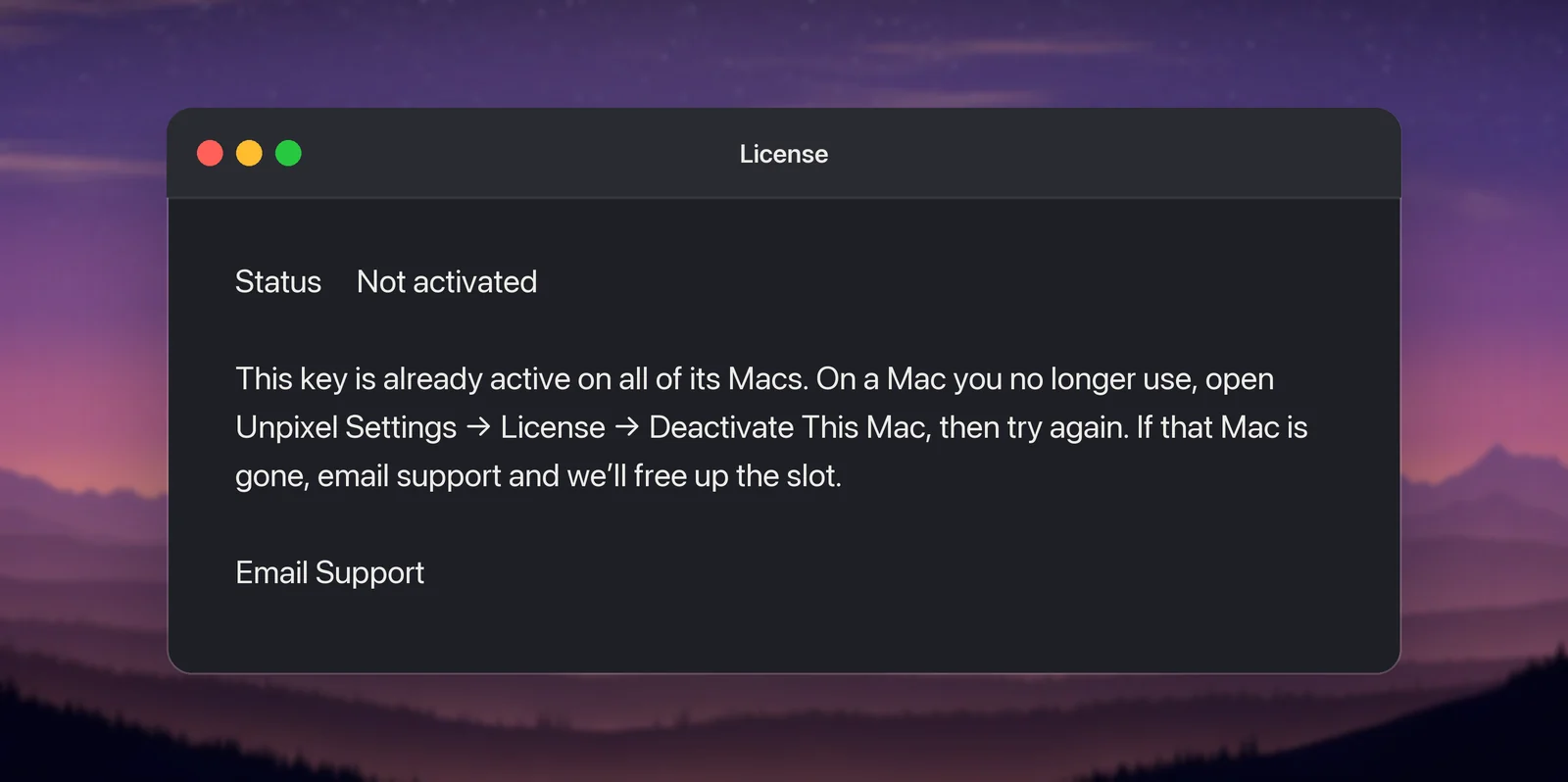
A variant adds: “An earlier attempt on this Mac may have gone through before the connection dropped.” That means a previous try timed out but probably reached the server and took a slot. Don’t keep retrying. Email support with your key and they’ll free that activation.
“That key wasn’t found”
The full message is “That key wasn’t found. Check for typos, or paste it straight from your purchase email.” The license server doesn’t know the key you entered.
- Copy the whole key from the purchase email or the confirmation page. Spaces and line breaks that come along are removed for you, but a missing character isn’t.
- Make sure you copied the license key, not the order reference or payment ID from the receipt.
- Can’t find the email? The customer portal shows your key. See Lost your license key?.
“This key has been disabled”
“This key has been disabled, usually after a refund. If that’s a mistake, email support.” Keys are disabled when a payment is refunded or disputed with the bank. If you asked for a refund, this is expected. If you didn’t, click Email Support and include your order reference.
A similar message, “That key isn’t active”, appears when Unpixel checks a new key before replacing the one this Mac uses. It covers the same two cases: a typo, or a disabled key.
“License no longer valid”
This one appears on a Mac that was already activated. The panel banner says License no longer valid with Email Support and Enter Key… buttons. In Settings → License it reads: “This Mac’s license was deactivated, refunded or disabled. Enter another key, or contact support if that’s a mistake.” A line under it shows when it happened and the last characters of the key.
It means the license server answered that this key, or this Mac’s activation on it, is no longer valid. The usual reasons are a refund, a payment dispute, or support freeing this Mac’s slot at your request.
- You have another key: click Enter Key… and activate it.
- It’s a mistake: click Email Support. If the key is turned back on, entering it again reuses this Mac’s activation instead of taking a new slot.
“Couldn’t read your license”
Your license is stored in your login keychain, and macOS didn’t let Unpixel read it. This can happen right after an update or while the keychain is locked. The message ends with “Your license hasn’t been removed.”
- Click Retry in the panel’s banner or in Settings → License.
- If macOS asks whether Unpixel may use the item “Unpixel License” in your keychain, enter your Mac login password and click Allow or Always Allow.
While the item can’t be read, nothing is activated or overwritten, so no slot is used. Only if the item is damaged beyond reading does Reset License on This Mac… appear. It deletes the stored license so you can activate again. This Mac may still count as one of your Macs until support frees it.
Connection messages
Activating and checking a license both need the license server, run by Dodo Payments.
| Message | What to do |
|---|---|
| “Couldn’t reach the license server. Check your internet connection and try again.” | Check the connection. A VPN, firewall or hotel Wi-Fi sign-in page can block it |
| “The license server isn’t responding right now (error 503). Try again in a few minutes.” | Wait and try again; the number varies |
| “Too many attempts. Wait a minute, then try again.” | Wait a minute before the next try |
| “Something went wrong while checking your key. Try again, or email support.” | Try again; on a company network, a filtering proxy may be answering instead of the server |
An activated Mac keeps working offline for 30 days after its last successful check. Settings → License shows Activated · Offline with the days left. After 30 days the panel shows Verify your license with a Verify Now button, and captures start again as soon as a check succeeds. Using Unpixel offline explains the timing.
Activated on another Mac
Settings → License can show a note starting “The license stored here was activated on another Mac”. It appears when a stored license was copied over from a different Mac, for example by Migration Assistant or a restored backup. Unpixel won’t use or deactivate that other Mac’s activation. Activate your key on this Mac; if all of its Macs are in use, deactivate the old one first.
Already activated, or another key in use
- “This key is already activated on this Mac.” Nothing to do; captures should work.
- “This Mac is already activated with another key. Deactivate it in Settings → License first.” Deactivate the current key, or open the Activate in Unpixel link from your new purchase, which asks before replacing the license.
When deactivating fails
If Deactivate This Mac… can’t reach the server, your license stays in place and you can try again later. After a failure, Remove from This Mac Anyway… also appears. It removes the license from this Mac without telling the server, so this Mac keeps one of your slots until support frees it. Choose Remove and Email Support to send that request.
When you write to support, include the exact message, the email you bought with or your order reference, and which Macs are involved. Never post your key in public forums.
Frequently asked questions
Does a failed activation use up one of my Macs?
Not when Unpixel gets a clear answer, such as a key that wasn’t found. If the connection drops after the request was sent, the server may have counted it, so contact support before retrying many times.
Is my license deleted when an error appears?
No. A license that can’t be read or verified stays on your Mac. Unpixel only removes it when you deactivate, or when you confirm a reset or a removal yourself.