Each Unpixel key works on a set number of Macs: 1, 2 or 3, depending on what you bought. Moving to a new Mac means freeing the old Mac’s place on the key first, then activating the key on the new one. Both steps need an internet connection.
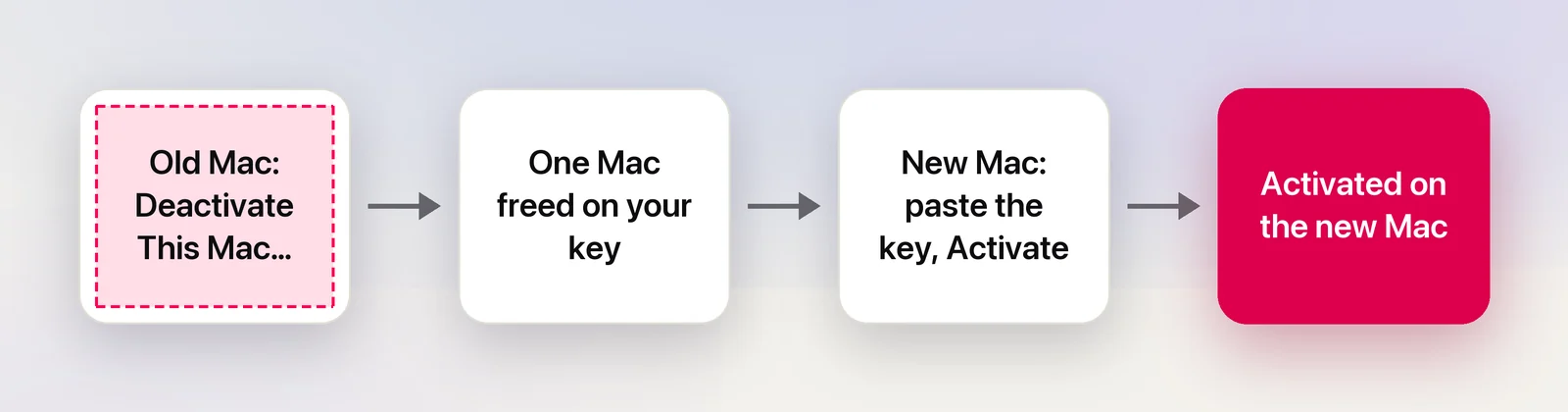
On the old Mac, open Unpixel’s Settings → License, click Deactivate This Mac… and choose Copy Key and Deactivate. That frees one of your license’s Macs. On the new Mac, install Unpixel, paste the key and click Activate. If the old Mac is broken or was erased without deactivating, email support and we’ll free its activation.
Deactivate on the old Mac
- Right-click the Unpixel icon in the menu bar and choose Settings…, then click License.
- Click Deactivate This Mac….
- Unpixel asks “Deactivate Unpixel on this Mac?” and explains that your key will be removed from this Mac. Choose one:
- Copy Key and Deactivate puts the key on the clipboard first. Paste it somewhere safe, such as a note or your password manager.
- Deactivate if your purchase email is at hand.
- Cancel to keep everything as it is.
- When it’s done, the pane says “Deactivated. This Mac’s slot is free, so you can activate your key on another Mac.” The key stays on screen, with a copy button, until you quit Unpixel.
From then on, Unpixel won’t copy text on that Mac. Your settings and capture history stay there; if you’re selling or giving the Mac away, uninstall Unpixel completely or erase the Mac after deactivating.
Activate on the new Mac
- Install Unpixel from the Download page.
- In the welcome guide, paste your key and click Activate. If you’re past the welcome guide, use Settings → License instead.
- Status shows Activated, and This Mac shows the new Mac’s name.
Activate your license walks through both screens.
If you used Migration Assistant
Migration Assistant moves your apps, accounts and settings to the new Mac, and your keychain can bring the old Mac’s Unpixel license along with it. Unpixel notices that the license belongs to another Mac and doesn’t use it. Settings → License says the license stored here was activated on another Mac, names that Mac, and asks you to activate your key on this one.
If your key still has a free Mac, just click Activate. If not, deactivate the old Mac first if you still have it. Unpixel on the new Mac never deactivates the old one for you.
If deactivation fails
Deactivating has to reach the license server. If it can’t, the reason appears in Settings → License, usually “Couldn’t reach the license server. Check your internet connection and try again.” Connect and click Deactivate This Mac… again.
A Remove from This Mac Anyway… button appears next to the error. Save it for a Mac that won’t be online again: it removes the license from this Mac without telling the server, so the Mac keeps counting against your key:
- Remove and Email Support removes it and opens an email to support asking to free that activation. The email carries the details support needs, but never your full key.
- Remove just removes it.
If the old Mac is gone
A Mac that broke, was stolen, or was erased or sold without deactivating still counts against your key.
- A key with Macs to spare (2 or 3 Macs) simply activates on the new Mac.
- A key that’s full shows “This key is already active on all of its Macs.” with an Email Support link. Write from the address you bought with and, if you remember it, include the old Mac’s name. Support frees the activation, then you activate again.
How many Macs your license covers
| License | Macs |
|---|---|
| $5.99 | 1 |
| $9.99 | 2 |
| $13.99 | 3 |
Each is a one-time purchase. Settings → License shows yours next to Product, for example “Activates up to 2 Macs”. Need more than your key allows? Buy Another License in the same pane gets you a second key. Bought the wrong size in the last 14 days? See Refunds.
Reinstalling Unpixel on the same Mac doesn’t use another activation. The license stays in your keychain, and the new copy picks it up.
Frequently asked questions
Do I need to deactivate before reinstalling macOS or erasing my Mac?
Yes, if you can. Erasing removes the activation from the Mac but not from your key, so that Mac keeps counting until support frees it.
Do I lose my capture history when I deactivate?
No. Deactivating only removes the license. History and settings stay on the old Mac until you delete them.
Can I give my license to someone else?
No. The Terms of Service describe a personal license that you can move between your own Macs, and ask you not to share or resell the key.
Sources
- Transfer to a new Mac with Migration Assistant — Apple Support support.apple.com