Safari has Apple’s Live Text built in, so before you reach for any other tool, try selecting the text right where it is. Images on web pages usually work, and so do some paused videos. What’s left over is text Safari never treats as a picture: canvas web apps, map labels, video players with their own overlays, and protected video. This page sorts out which is which.
Safari already reads text in web images with Live Text: hover over the words, drag to select them, then Control-click and choose Copy. Some paused web videos work the same way on a Mac with Apple silicon. For text Safari can’t reach, such as canvas apps, map labels, overlays or a moving video, capture it from the screen with a tool like Unpixel (⇧⌘2).
What Safari already does
| What you’re looking at | Safari’s own tool |
|---|---|
| Ordinary text on a page | Select it and press ⌘C |
| A cluttered article that’s hard to select | Reader, which strips the page down to its text |
| A page in another language | Safari’s built-in page translation |
| Text inside an image | Live Text |
| A paused web video | Live Text, on some players (Apple silicon) |
Reader and page translation have their own guides: Safari Reader on Mac and translating a website. The rest of this page is about the last two rows and what falls outside them.
Images and paused videos
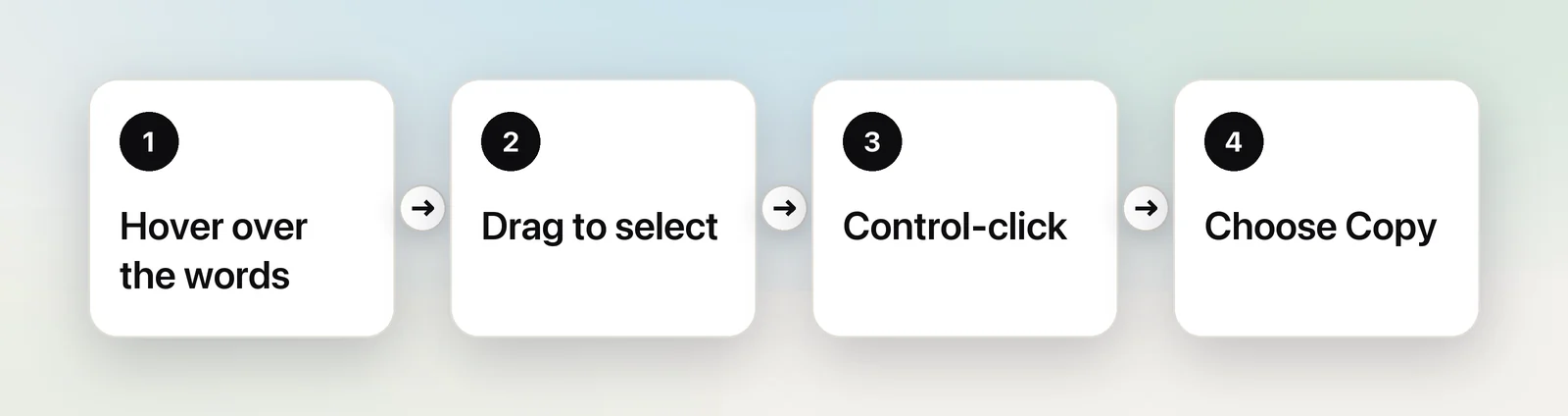
Live Text treats the words in a picture almost like text in a document. Apple’s Safari guide describes it like this:
- Go to an image with text in it.
- Hover over the words. When the pointer becomes a text cursor, drag to select them.
- Control-click the selection.
- Choose Copy, or another action such as Look Up, Translate or a web search.
Some text gets extra actions in that menu: Apple lists calling or messaging a phone number, writing to an email address and showing a street address in Maps. If the pointer never turns into a text cursor, check that Live Text is switched on in System Settings → General → Language & Region.
On a Mac with Apple silicon, Safari also offers Live Text on paused web video, a feature WebKit introduced with Safari 16. Pause on a sharp frame and try dragging across the words. Sites that lay their own controls or invisible layers over the picture can block it, so it works on some players and not others.
Text Safari can’t select
Some text on a web page isn’t part of an image or the page’s text at all, so neither selection nor Live Text reaches it:
- Canvas web apps. Online whiteboards, design tools and some charting dashboards paint text into a canvas. To Safari it’s a drawing.
- Map labels. Street and place names in an embedded map are part of the map imagery.
- Backgrounds and overlays. A headline set into a page’s background image, or a banner layered over a video, often isn’t offered to Live Text.
- Players that block Live Text. Custom video players can stop Live Text even when the video itself is visible.
- Sites that block selection. Some pages switch off selecting and copying. Our guide to copying from a site that won’t let you covers the polite fixes.
In Unpixel
Unpixel doesn’t care how a page draws its text, because it reads what’s on your screen. Press ⇧⌘2, drag over the words, and let go: the text is on your clipboard. It reads the frame that’s on screen at the moment you let go, so a caption or lower-third that holds still can be copied without pausing; for text that moves, pause first. Recognition runs on your Mac with Apple’s Vision framework, the same on-device approach Live Text uses.
Each capture lands in Unpixel’s history with the app it came from, such as “Safari · Just now”, so you can find a line you grabbed from a web page later in the day. A table on a page you can’t select, like a chart’s data table drawn as a picture, pastes into Numbers or Excel as cells.
Protected video
Streaming services that protect their films and shows ask macOS to keep those frames out of screenshots and screen recordings. In Safari, that means a black rectangle wherever the video should be, both in a screenshot and in any capture tool. Unpixel can’t read it either; nothing can, and that’s by design.
What still works: turn on the service’s subtitles and read them, look for a transcript or episode notes, or type the few words you need. Our explainer on why screenshots of videos turn black has the details.
Links
Safari already handles real links: Control-click and choose Copy Link. The tricky ones are addresses shown as pictures, such as a URL printed on a slide in an embedded video, or written into an image.
Live Text can read those in images, and the menu for a web address offers to open it. In Unpixel, drag tightly around just the address; a single address is recognized as a link and filed under Links in the history, where Open Link opens it. If the address belongs to a QR code instead, select the code, and Unpixel copies the address the code contains. Either way, read the address before you open it. Recognition can confuse look-alike characters, and a link in an image is easy to fake.
If you also use Chrome, our page on Chrome covers Google Lens, Chrome’s answer to Live Text.
Frequently asked questions
Why can’t I select text in an image in Safari?
Check that Live Text is on in System Settings → General → Language & Region. Some text only looks like an image: it may be a background, a canvas or part of a video player, which Live Text doesn’t treat as a picture.
Does Live Text in Safari send the image anywhere?
Apple’s Live Text recognizes text on your Mac. Actions you choose afterwards, such as a web search for the selected words, can go online.
Why is a video black when I capture it in Safari?
The site protects its video from screen capture. macOS keeps those frames out of screenshots and recordings, so every capture tool sees black. Use the site’s subtitles or a transcript instead.