A clipboard manager remembers what you copied, so the link from this morning is still there after you’ve copied ten other things. Since macOS Tahoe, every Mac has a basic one in Spotlight, which changes the question from “which app?” to “do I need an app at all?” Here’s how to decide, and how the popular options compare.
On macOS Tahoe, try Spotlight’s clipboard first: press ⌘Space, then ⌘4. It’s free but keeps copies for a week at most. For longer history, pins or images, Maccy is free and open source and Raycast’s free plan keeps three months. Paste, Pastebot and Alfred’s Powerpack cost money and add iPhone sync, filters or workflows.
Try Spotlight’s clipboard first
On macOS Tahoe 26 and later:
- Press ⌘Space, then ⌘4.
- The first time, Spotlight may ask you to turn clipboard results on. History starts from that moment.
- Type to filter, select an item and press ⌘C (or click its copy button), then paste with ⌘V.
You control it in System Settings → Spotlight → Results from Clipboard. On macOS 26.1 and later, Macworld reports a choice of 30 minutes, 8 hours or 7 days, plus a button to clear the list.
It’s free and already there, and for many people that’s enough. It falls short if you want history that lasts weeks, pinned snippets, or one shortcut that pastes an older item straight into the front app: Apple’s steps copy the item back first. Apple’s guide doesn’t describe a way to keep particular apps out of it, and it warns that sensitive information may appear in the history. Our clipboard history guide covers Spotlight’s version in detail.
What to look for in an app
Before comparing names, decide which of these you actually need:
- Retention. Days, months or forever? Longer history is handier, and riskier.
- Pins and snippets. Do you paste the same address, sign-off or code block every day?
- Content types. Plain text only, or images, files and rich text too?
- Pasting. Does it paste directly into the front app, or only copy the item back?
- Sync. Do you need your history on an iPhone or a second Mac?
- Privacy controls. An ignore list, password handling and encrypted storage.
- Price model. Free, one-time, or a subscription.
Options compared
Prices and features below come from each maker’s own site, as of October 2026. Prices are in US dollars except Alfred’s, which is sold in pounds.
| App | Price | History | Stands out for |
|---|---|---|---|
| Spotlight (macOS Tahoe) | Included | Up to 7 days | Nothing to install |
| Maccy | Free, open source | Configurable | Lightweight, keyboard-first |
| Raycast | Free plan; Pro $10 a month | 3 months free; unlimited on Pro | Part of a full launcher |
| Alfred Powerpack | £34, or £59 with lifetime upgrades | 24 hours to 3 months | Workflows, snippets |
| Paste | $2.49 a month, $29.99 a year, or a lifetime licence | No limit | Mac, iPhone and iPad with iCloud |
| Pastebot | $39 with a year of updates, or an App Store subscription | Configurable | Filters, sequential paste |
Maccy is the simplest step up from Spotlight. It’s MIT-licensed, opens with ⇧⌘C, and pins an item with ⌥P. Its README lists macOS Sonoma 14 or later and installation with Homebrew.
Raycast includes Clipboard History in its free plan alongside a launcher, snippets and window management. Its site says history is encrypted on your Mac and that passwords from password managers are ignored by default. Pro, at $10 a month or $96 a year as of October 2026, adds unlimited history and cloud sync.
Alfred keeps clipboard history in its paid Powerpack. It’s off by default “for privacy reasons”, according to Alfred’s help, and lets you keep items for 24 hours, 7 days, 1 month or 3 months. It can merge copies and save a clip as a snippet.
Paste is the polished, cross-device choice: unlimited history, pinboards for reusable items, and apps for Mac, iPhone and iPad that sync through your private iCloud. As of October 2026 it’s sold by subscription or as a lifetime licence, with a 7-day trial, and it’s also included in Setapp.
Pastebot suits people who transform text as they paste. Filters clean or reformat a clip, a stack pastes several items in order, and iCloud sync keeps two Macs in step. As of October 2026, Tapbots sells it for $39 with a year of updates, or as an App Store subscription at $24.99 a year; both come with a 14-day trial. The current version, Pastebot 3, needs macOS 26 Tahoe.
If you already use Raycast or Alfred as a launcher, start there before adding another app. Our Raycast vs Alfred comparison helps if you’re choosing between the two.
Privacy: passwords and sensitive apps
A clipboard manager stores things you never meant to keep: one-time codes, card numbers, the odd password. Two mechanisms keep that in check.
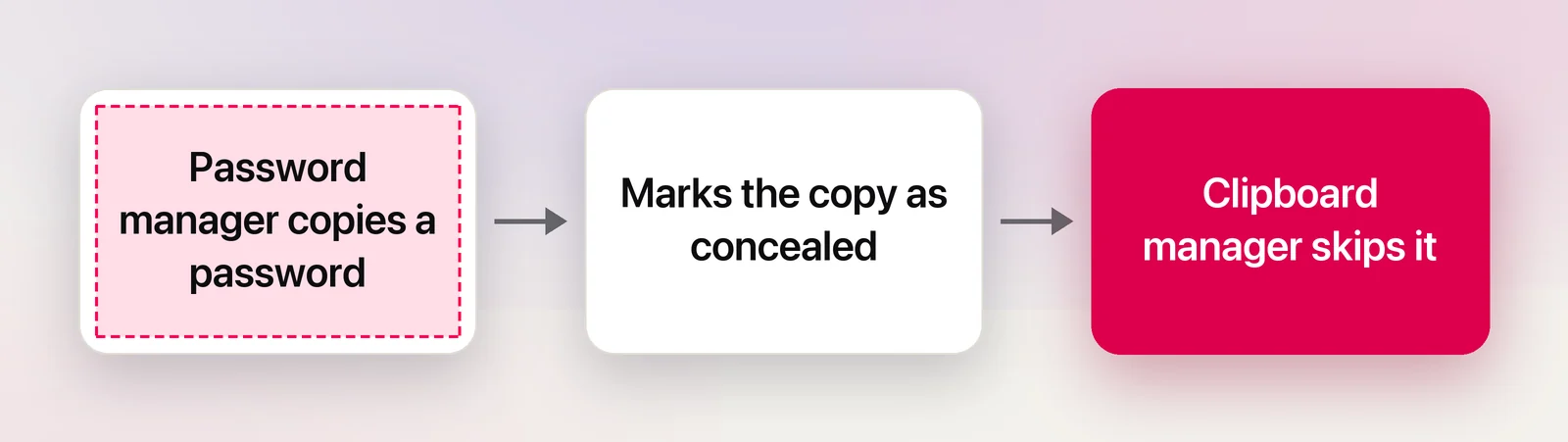
The first is a shared convention. Apps can attach markers, documented at NSPasteboard.org, that say a copy is concealed, transient or auto-generated. Password managers use the concealed marker, and well-behaved clipboard managers skip or hide those items. Maccy ignores all three markers by default, Alfred ignores concealed data, and Raycast skips passwords from password managers. NSPasteboard.org also notes that not every app applies the markers correctly.
The second is an ignore list, and it’s your backstop. Alfred starts its list with Keychain Access and 1Password, Paste lets you set rules for passwords and sensitive apps, and Pastebot can block an app entirely. Add your banking app, password manager and anything that shows patient or client data.
A few habits help too:
- Keep retention as short as your work allows.
- Pause or clear the history before you share your screen.
- Check where the history is stored. Local and encrypted is the safest; synced history is only as safe as that account.
More on this in clipboard privacy on Mac.
Our pick by need
- You copy a few things a day: Spotlight’s clipboard.
- You want free, fast and nothing else: Maccy.
- You also want a launcher, snippets and window tiling: Raycast’s free plan.
- You already own the Alfred Powerpack: its clipboard history.
- You copy on your iPhone and paste on your Mac: Paste.
- You reformat text constantly: Pastebot.
A note on Unpixel
Unpixel, which we make, isn’t a clipboard manager, and it doesn’t try to be one. It copies text you can’t select, from a video, a screen share or a scanned page, onto the clipboard. Its own history keeps only those captures, with filters for text, links and QR codes. Any clipboard manager above will also record that text, because it arrives on the clipboard like any other copy.
Frequently asked questions
Is there a free clipboard manager for Mac?
Yes. Spotlight’s clipboard history is built into macOS Tahoe, Maccy is free and open source, and Raycast’s free plan includes a clipboard history that keeps items for up to three months.
Do clipboard managers save my passwords?
Good ones skip copies that password managers mark as concealed, and several also let you list apps to ignore. Not every app marks its copies, so add your password manager and banking apps to the ignore list yourself.
Which clipboard manager syncs with my iPhone?
Paste is the one built for it: its Mac, iPhone and iPad apps share one history through your private iCloud. Pastebot syncs only between Macs. Raycast has an iPhone app and cloud sync on Pro, but as of October 2026 its site doesn’t list clipboard history among what reaches the phone.
Is Unpixel a clipboard manager?
No. Its history only holds text it recognized from the screen, an image or a PDF. What you copy with ⌘C in other apps isn’t recorded.
Sources
- Search your Clipboard history in Spotlight on Mac — Apple Support (macOS Tahoe 26) support.apple.com
- This macOS Tahoe 26.1 setting will eliminate embarrassing clipboard mishaps — Macworld macworld.com
- Maccy — GitHub (read October 2026) github.com
- Paste pricing (read October 2026) pasteapp.io
- Paste — clipboard manager for Mac, iPhone and iPad pasteapp.io
- Pastebot — Tapbots (read October 2026) tapbots.com
- Raycast pricing (read October 2026) raycast.com
- Clipboard History — Raycast raycast.com
- Raycast for iOS — Raycast blog raycast.com
- Clipboard History — Alfred Help alfredapp.com
- Buy the Alfred Powerpack (read October 2026) alfredapp.com
- NSPasteboard.org — identifying special pasteboard types nspasteboard.org