Apple’s text recognition on a Mac reads about 30 languages, but which ones depends on the mode, and the list isn’t the same everywhere Apple publishes one. Here’s the list as macOS 26 reports it, how Live Text’s list differs, and what happens when you point OCR at a script it doesn’t know.
On macOS 26, Apple’s Vision framework reads 30 languages and variants in its accurate mode, including English, most major European languages, Russian, Ukrainian, Chinese, Cantonese, Japanese, Korean, Arabic, Thai and Vietnamese. Fast mode reads only English, French, German, Italian, Portuguese and Spanish. Greek, Hebrew and Hindi aren’t supported, so text in those scripts comes back empty or wrong.
The list on macOS 26
Every built-in OCR route on a Mac, and most third-party apps, read text through Apple’s Vision framework. Apps can ask Vision which languages it supports. We asked it on a Mac running macOS 26.6, and accurate mode returned 30 entries:
| Group | Languages (Vision code) |
|---|---|
| Western European | English (en-US), French (fr-FR), German (de-DE), Italian (it-IT), Spanish (es-ES), Portuguese (pt-BR), Dutch (nl-NL) |
| Nordic | Danish (da-DK), Swedish (sv-SE), Norwegian (no-NO), Norwegian Bokmål (nb-NO), Norwegian Nynorsk (nn-NO) |
| Central and Eastern European | Czech (cs-CZ), Polish (pl-PL), Romanian (ro-RO), Russian (ru-RU), Ukrainian (uk-UA) |
| Chinese characters | Chinese Simplified (zh-Hans), Chinese Traditional (zh-Hant), Cantonese Simplified (yue-Hans), Cantonese Traditional (yue-Hant) |
| Other East and Southeast Asian | Japanese (ja-JP), Korean (ko-KR), Thai (th-TH), Vietnamese (vi-VT), Indonesian (id-ID), Malay (ms-MY) |
| Arabic and Turkish | Arabic (ar-SA), Najdi Arabic (ars-SA), Turkish (tr-TR) |
Two notes on reading the list. The codes name one regional form of each language: there’s a single entry for Spanish, for example, not one per country. And Apple can change the list with any macOS update, so treat this as a snapshot from October 2026.
Fast mode’s limits
Vision has a second, quicker recognition level. Apple describes it as reading character by character, closer to traditional OCR. On macOS 26 it supports only six languages: English, French, German, Italian, Portuguese and Spanish.
Point fast mode at anything else and you get nothing, or something worse. In our test, it returned no text for a line of Chinese or Japanese, and a string of random Latin letters and digits for Korean. If an app offers a fast mode and you read non-Latin scripts, keep it on accurate. Our article on fast vs accurate OCR covers when the speed is worth it.
Live Text: published lists vs what macOS reports
Apple publishes Live Text’s languages separately, on its feature availability pages, and those lists don’t match Vision’s:
- As of October 2026, the iPhone and iPad page lists Live Text in 24 languages, including Japanese, Korean, Russian, Thai, Ukrainian and Vietnamese, but not Arabic.
- The Mac page lists a shorter set: Chinese, Cantonese, English, French, German, Italian and Portuguese. It omits Japanese and Korean, even though Apple announced both for Live Text on the Mac with macOS Ventura.
The Mac itself tells a different story. Apps can ask Live Text’s engine (VisionKit’s ImageAnalyzer) which languages it reads, and on our Mac running macOS 26.6 it returned the same 30 entries as Vision’s accurate mode, Arabic included. So treat the published lists as a guide rather than a guarantee. The quickest check is practical: open an image with the text in Preview and try to select it.
Automatic detection vs choosing a language
By default, Vision works out the language of each image itself. That’s convenient, and for a sentence or more it’s usually right. Detection struggles when there’s little to go on, or when one line mixes scripts.
Two results from our test on macOS 26 show the effect:
- A short Japanese label. 営業時間変更 (“change of opening hours”) is six kanji with no kana. With automatic detection it came back wrong at every size we tried, from 11 to 28 pixels: the first character was misread or dropped, and 変 came back as 变, its Simplified Chinese form. With Japanese chosen, every character came back right. A full Japanese sentence read correctly either way, even at 9 pixels.
- A line mixing two languages. “Menu: 抹茶ラテ (matcha latte) — ¥580” at 28 pixels, with automatic detection, kept the English and turned the Japanese into stray symbols (“#*5>”) and the yen sign into a dot. With Japanese chosen, every word came back right, including the English, though the colon and brackets turned into their full-width Japanese forms and the dash into a hyphen. The same line at 16 pixels read correctly with automatic detection, so results vary.
If your OCR tool lets you choose a language, choose it for short or mixed text, then switch back. Live Text and the Shortcuts action don’t offer a choice, and Live Text’s engine misread the kanji label too.
How we tested. We drew each sample ourselves as black text on white, mostly at 28 pixels. The fonts were Hiragino Sans for Japanese, PingFang for Chinese, Apple SD Gothic Neo for Korean, and Helvetica, Arial Hebrew and Kohinoor Devanagari for the unsupported scripts. We read them with Vision’s text request, and with Live Text’s engine where noted, on a Mac with an Apple M2 chip running macOS 26.6.2. These are clean images; photos and scans will do worse.
Languages that aren’t supported
Plenty of widely used scripts aren’t in Vision’s list on macOS 26, including Greek, Hebrew and the Indian scripts such as Devanagari (Hindi, Marathi, Nepali). What happens when you try is worth knowing, because it isn’t always obvious:
- Hindi came back as a comma and three Korean syllables with automatic detection on, and as nothing with it off.
- Hebrew came back as Latin gibberish: “cıze nt' al ALal ba¿”.
- Greek came back as Latin letters that look similar. “Καλημέρα” became “Kanuépa”, which looks plausible at a glance and is meaningless.
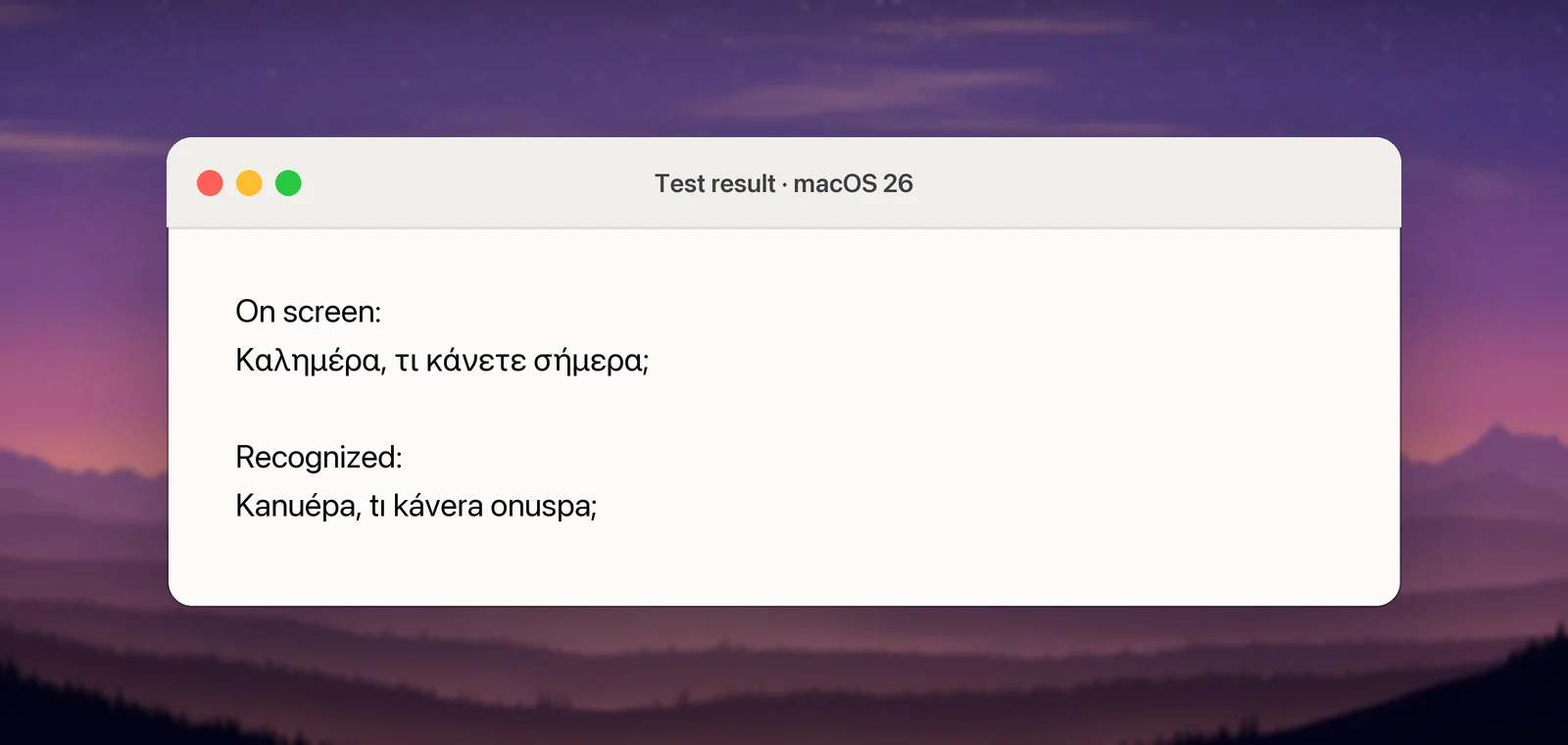
The Greek case is the dangerous one: output that looks like text in roughly the right alphabet. Vision gave the Greek line a confidence score of 0.5 and the Hebrew 0.3, while every line it read correctly in our test scored 1.0. A low score is a useful warning but not a guarantee: the garbled menu line above scored 1.0 as well. If you work with an unsupported script, you’ll need another engine. Tesseract, the open-source OCR engine, publishes trained models for more than 100 languages, including Greek, Hebrew, Hindi and historical scripts. Apple Vision vs Tesseract compares the two, and online services such as Google Drive cover many languages too, at the cost of uploading your image.
Mixed-language text
Real documents mix languages all the time: an English report quoting a Japanese title, a menu with Chinese dish names and English translations, a Ukrainian page with Latin product codes.
- One main language, short foreign phrases: automatic detection usually gets the main language right and may garble the rest. Capture the foreign phrase separately, with its language chosen.
- Two Latin-script languages, such as English and French: generally fine, since they share an alphabet. Accents are the thing to check.
- Latin and a non-Latin script in one line: choose the non-Latin language. In our test, Japanese mode read the English half correctly too.
In Unpixel
Unpixel, which we make, reads text with Apple’s Vision on your Mac, so its languages are exactly the ones above. It detects the language of each capture by default; to choose one, turn off Detect language automatically in Settings → Recognition and pick from the Language menu, which shows what your Mac supports in the current mode. If you choose a language that Fast mode can’t read, those captures use Accurate. Recognition languages and automatic detection has the details. Unpixel can’t add languages Vision doesn’t have, so for Greek, Hebrew or Hindi, use one of the alternatives above.
Frequently asked questions
How many languages can Apple’s OCR read?
On macOS 26, Vision’s accurate mode reports 30 entries, some of which are variants of one language, such as Norwegian Bokmål and Nynorsk. Fast mode reports six.
Can a Mac read Arabic text in images?
Yes. On macOS 26, Vision lists Arabic and Najdi Arabic in accurate mode, and Live Text’s engine reports the same. Apple’s published Live Text language lists didn’t include Arabic as of October 2026, so try it on your own images.
Can Mac OCR read Hindi or Hebrew?
Not with Apple’s built-in recognition on macOS 26. In our test, a line of Hebrew came back as meaningless Latin letters, and a line of Hindi as a few stray Korean characters, or as nothing with automatic detection off. Tesseract has trained data for both, and some online services support them.
Do I need to download languages for OCR?
No. Vision’s recognition languages are part of macOS. Downloads come up only for translation, which is a separate feature.
Sources
- VNRecognizeTextRequest (supportedRecognitionLanguages) — Apple Developer Documentation developer.apple.com
- Recognizing Text in Images — Apple Developer Documentation developer.apple.com
- ImageAnalyzer.supportedTextRecognitionLanguages (Live Text in apps) — Apple Developer Documentation developer.apple.com
- macOS Feature Availability (Live Text languages) — Apple apple.com
- iOS and iPadOS Feature Availability (Live Text languages) — Apple apple.com
- macOS Ventura is now available (Live Text adds Japanese and Korean) — Apple Newsroom apple.com
- tessdata_best: trained models for Tesseract — GitHub github.com